Tutorials
Figure 1.1 shows the architecture of tutorials. The 1D, 2D, and 3D tutorials are presented here.
1D tutorials
Figure 1.2 shows the architecture of the 1D tutorials. The inputs and expected outputs of the 1D tutorials are described below.
AblationTestCase_1.0
Model/Tutorial |
AblationTestCase_1.0 |
|---|---|
Mass |
|
Energy |
|
IO |
|
Gas Properties |
|
Material Properties |
|
Pyrolysis |
|
TimeControl |
IO {
  writeFields (Ta);
  probingFunctions (plotDict surfacePatchDict);
}
Pyrolysis {
  PyrolysisType LinearArrhenius;
}
Mass {
  MassType DarcyLaw;
}
Energy {
  EnergyType Pyrolysis;
}
GasProperties {
  GasPropertiesType Tabulated;
  GasPropertiesFile
  "$PATO_DIR/data/Materials/Composites/TACOT/gasProperties";
}
MaterialProperties {
  MaterialPropertiesType Porous;
  MaterialPropertiesDirectory
  "$PATO_DIR/data/Materials/Composites/TACOT";
}
TimeControl {
  TimeControlType GradP;
  chemTransEulerStepLimiter no;
}
The TACOT material is made of a carbon fiber phase and a phenolic matrix phase that evaporates at high temperature. Listing [lis:1.0_3] shows the initial solid density and the volume fraction of the 2 phases.
nSolidPhases    2;
rhoI[1] rhoI[1] [1 -3 0 0 0 0 0] 1600;
epsI[1] epsI[1] [0 0 0 0 0 0 0] 0.1;
rhoI[2] rhoI[2] [1 -3 0 0 0 0 0] 1200;
epsI[2] epsI[2] [0 0 0 0 0 0 0] 0.1;
x[C] 0.2282;
x[ht] 0.6623;
x[O] 0.1095;
x[N] 0.0;
The gaseous elemental mole fractions (\(x[i]\)) of the TACOT material is considered constant during the simulation. In 1 kmole of phenolic resin (\(C_6H_6O\)), we have
50% of the total mass evaporates into gas. All the hydrogen and oxygen are transformed into gas. Therefore, only carbon is left in the charred material.
The writeFields input writes the Ta field every 0.1 s as defined in the controlDict file. The plotDict and surfacePatchDict files set the internal and the surface patch sampling configuration, coordinates and fields. Listing [lis:1.0_2] shows an example of Ta file that initializes the temperature. The dimension is Kelvin. All the internal cell centers have a uniform value of 300. The top boundary field varies linearly from 300 K to 1644 K during the first 0.1 s. The sides and bottom boundary fields have a zeroGradient boundary conditions (Eq. [eq:zeroGradient]).
dimensions      [0 0 0 1 0 0 0];
internalField   uniform 300;
boundaryField{
    top {
        type uniformFixedValue;
        uniformValue table ((0   300) (0.1 1644));
    }
    sides {
        type            zeroGradient;
    }
    bottom {
        type            zeroGradient;
    }
}
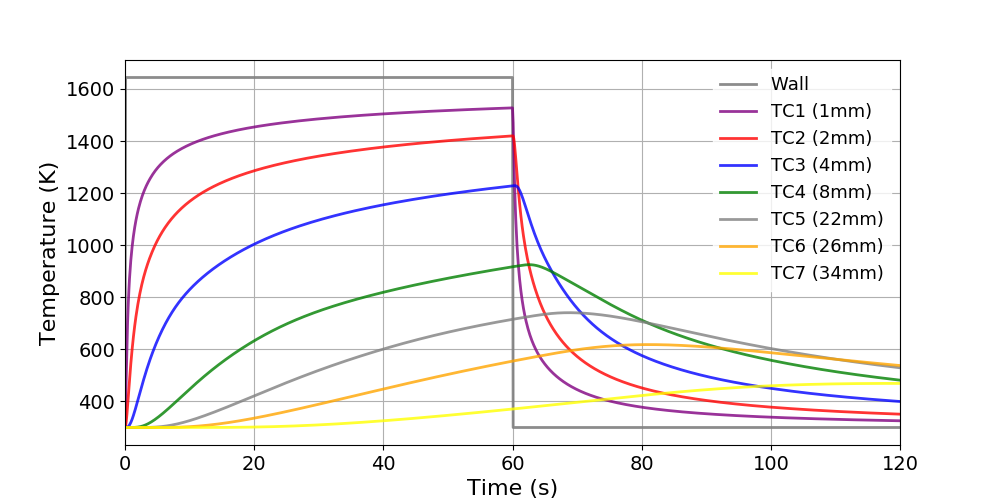
Thermal response of AblationTestCase_1.0 case
AblationTestCase_1.0_equilibriumElementConservation
The AblationTestCase_1.0_equilibriumElementConservation tutorial computes the 1D thermal response of the TACOT material using the elemental mass conservation (Fig. 1.4). Table 1.2 shows the summary of the material sub-models used in this case. Listing [lis:1.0_elem] shows the porousMatProperties file and the different user material sub-models.
Model/Tutorial |
AblationTestCase_1.0_equiElemCons |
|---|---|
Mass |
|
Energy |
|
IO |
|
Gas Properties |
|
Material Properties |
|
Pyrolysis |
|
MaterialChemistry |
|
TimeControl |
IO {
  probingFunctions (plotDict surfacePatchDict);
}
Mass {
  MassType DarcyLaw;
}
Energy {
  EnergyType Pyrolysis;
}
GasProperties {
  GasPropertiesType Equilibrium;
}
MaterialChemistry {
  MaterialChemistryType EquilibriumElement;
  mixture tacotair;
}
MaterialProperties {
  MaterialPropertiesType Porous;
  MaterialPropertiesDirectory
  "$PATO_DIR/data/Materials/Composites/TACOT";
}
Pyrolysis {
  PyrolysisType LinearArrhenius;
}
TimeControl {
  TimeControlType GradP;
  chemTransEulerStepLimiter no;
}
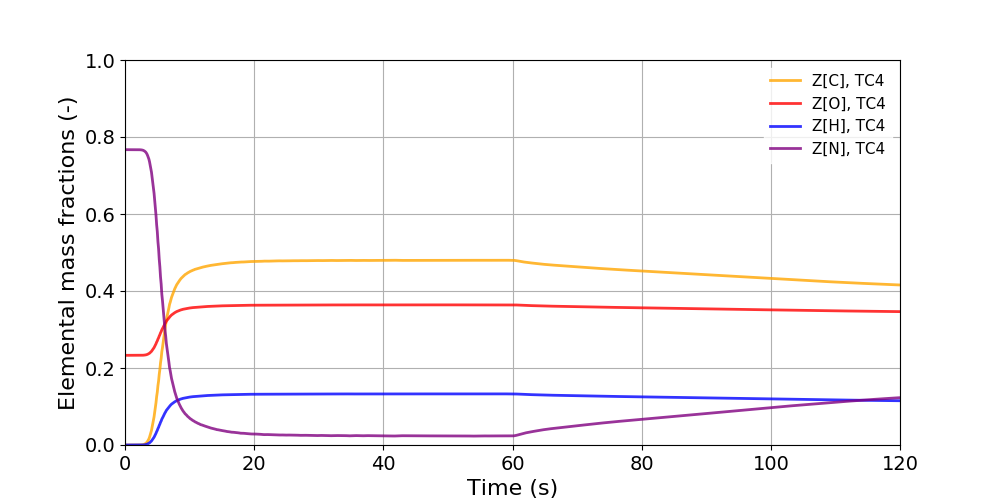
Temporal evolution of the elemental mass fractions
AblationTestCase_1.0_grading
The AblationTestCase_1.0_grading tutorial computes the 1D thermal response of a porous material with a graded phase (Fig. 1.5). Table 1.3 shows the summary of the material sub-models used in this case. Listing [lis:1.0_grading] shows the porousMatProperties file and the different user material sub-models. Listing [lis:1.0_grading_2] and [lis:1.0_grading_3] show the grading properties file and the related gradedTACOT constant properties. The phase 3 has a graded volume fraction from 0.1 to 0.02 for the first in-depth millimeter in the y-axis.
Model/Tutorial |
AblationTestCase_1.0_grading |
|---|---|
Mass |
|
Energy |
|
IO |
|
Gas Properties |
|
Material Properties |
|
Pyrolysis |
|
TimeControl |
IO {
  IOType Profile;
  topPatch top;
  bottomPatch bottom;
  plot1DProfileList (eps_s_phase1 eps_s_phase2 eps_s_phase3);
  plot1DMassLoss yes;
  probingFunctions (plotDict surfacePatchDict);
}
Mass {
  MassType DarcyLaw;
}
Energy {
  EnergyType Pyrolysis;
}
GasProperties {
  GasPropertiesType Tabulated;
  GasPropertiesFile
  "$PATO_DIR/data/Materials/Composites/TACOT/gasProperties";
}
MaterialProperties {
  MaterialPropertiesType GradedPorous;
  MaterialPropertiesDirectory
  "$PATO_DIR/data/Materials/Composites/TACOT";
}
Pyrolysis {
  PyrolysisType LinearArrhenius;
}
TimeControl {
  TimeControlType GradP;
  chemTransEulerStepLimiter no;
}
//  d(m)    epsI(-)
    0.05     0.1
    0.049    0.02
// grading prop. file name (distance and volume fraction)
gradingFileEpsI[3] "$FOAM_CASE/constant/grading";
// axis of the grading
gradingAxisEpsI[3] (0 1 0);
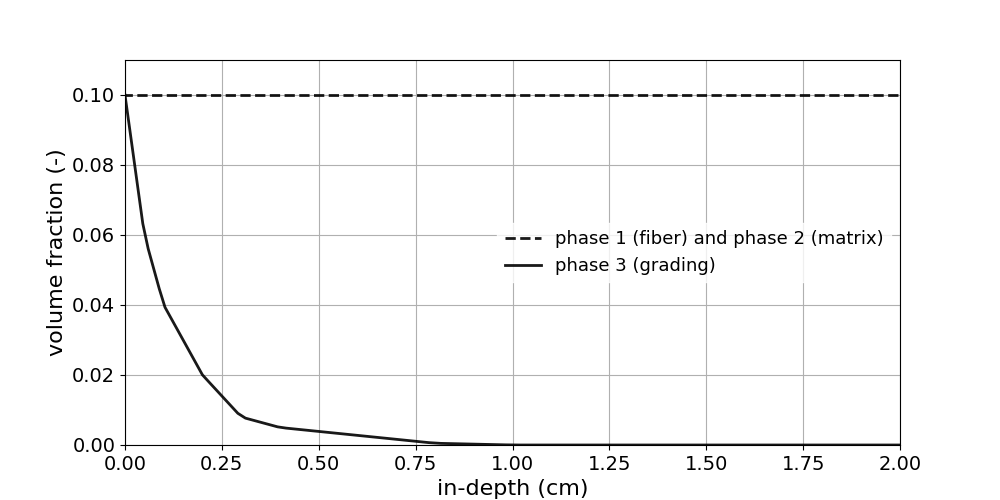
1D profile of the phases’ volume fraction
AblationTestCase_1.0_multiPorousMat
The AblationTestCase_1.0_multiPorousMat tutorial computes the 1D thermal response and the boundary interface between 2 porous materials: TACOT and Cork (Fig. 1.6). Listing [lis:1.0_multiPorous3] shows the mappedWall type in the boundary file of the porousMat1 polyMesh.
porousMat1_to_porousMat2
{
    type            mappedWall;
    inGroups        1(wall);
    nFaces          1;
    startFace       100;
    sampleMode      nearestPatchFace;
    sampleRegion    porousMat2;
    samplePatch     porousMat2_to_porousMat1;
}
Listing [lis:1.0_multiPorous] shows the boundary type of the pressure boundary field (Eq. [eq:bc_coupledMixed]).
boundaryField {
    porousMat1_to_porousMat2  {
      type            coupledMixed;
      value           uniform 300;
      Tnbr            p;
      kappaMethod     lookup;
      kappa           Gamma_symm;
    }
}
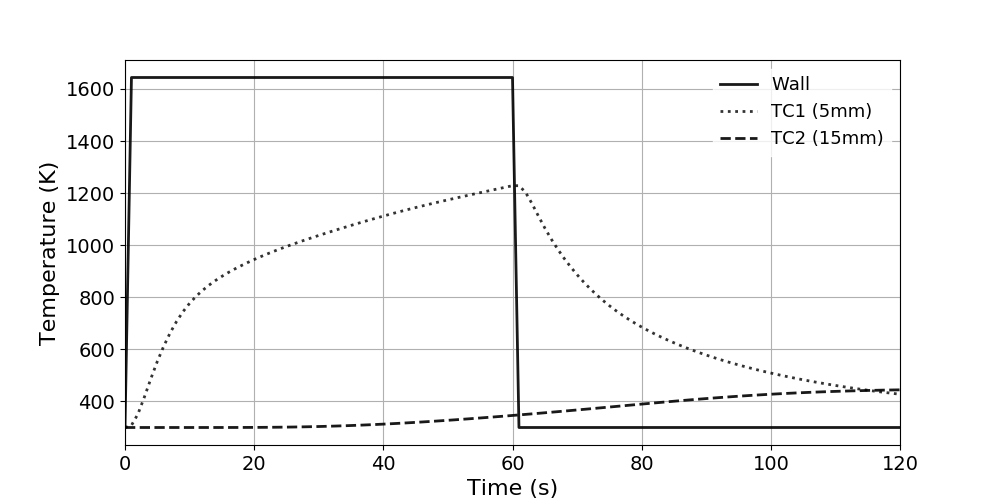
Thermal response of two adjacent porous materials
AblationTestCase_2.x
The AblationTestCase_2.x tutorial computes the 1D thermal response of the TACOT material using the surface mass and energy balance boundary conditions (Fig. 1.7). Listing [lis:2.x] shows the boundary type of the temperature boundary field (Eq. [eq:bc_bprime]). Listing [lis:2.x_2] shows a part of the BoundaryConditions file. During the first 0.1 s, the recovery enthalpy (\(h_r\)) varies from 0 to 1.5 MJ \(\cdot\) kg\(^{-1}\) and the heat transfer coefficient (\(C_H\)) from 3 to 300 kg \(\cdot\) m\(^{-2}\) \(\cdot\) s\(^{-1}\). The pressure (\(p = 101325\) Pa), the radiative heat flux (\(q_{rad} =\) 0 W \(\cdot\) m\(^{-2}\)), the blowing correction coefficient (\(\lambda = 0.5\)) and the background temperature (\(T_\infty = 300\) K) stay constant during the simulation. Listing [lis:2.x_3] shows the dynamic mesh flag that allows the boundary to move over time following the boundary conditions type (Eq. [eq:mesh1]).
boundaryField {
    top {
        type Bprime;
        mixtureMutationBprime tacot26;
        environmentDirectory
        "$PATO_DIR/data/Environments/RawData/Earth";
        mappingType constant;
        mappingFileName
        "constant/porousMat/BoundaryConditions";
        mappingFields
        ((rhoeUeCH "1") (h_r "2") (heatOn "3"));
        p 101325;
        qRad 0;
        lambda 0.5;
        Tbackground 300;
        value uniform 300;
    }
}
// t(s)    CH(kg/m2/s)    h_r(J/kg)  heatOn(-)
   0        0.3e-2         0           1
   0.1      0.3            1.5e6       1
movingMesh yes;
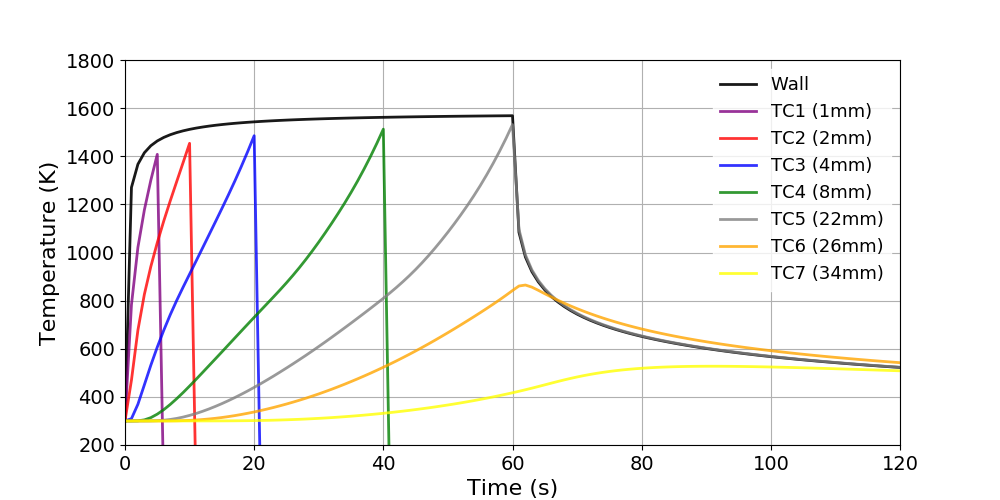
Thermal response of AblationTestCase_2.x case
AblationTestCase_2.x_chemistryOff
The AblationTestCase_2.x_chemistryOff tutorial computes the 1D thermal response of the TACOT material using the surface mass and energy balance and energy balance boundary condition without surface chemistry (Fig. 1.8). Listing [lis:2.x_ChemOff] shows the boundary type of the temperature boundary field (Eq. [eq:bc_bprime_ChemOff]).
boundaryField {
    top {
        type Bprime;
        mixtureMutationBprime tacot26;
        environmentDirectory
        "$PATO_DIR/data/Environments/RawData/Earth";
        movingMesh yes;
        mappingType constant;
        mappingFileName
        "constant/porousMat/BoundaryConditions";
        mappingFields
        (
            (p "1")
            (rhoeUeCH "2")
            (h_r "3")
            (hconv "4")
            (Tedge "5")
            (chemistryOn "6")
            );
        qRad 0;
        lambda 0.5;
        Tbackground 300;
        value uniform 300;
    }
}
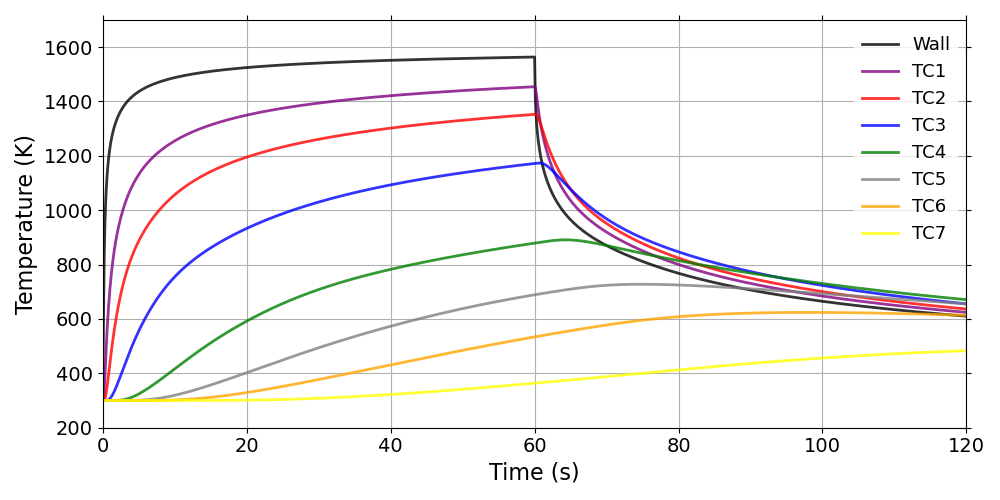
Thermal response of AblationTestCase_2.x_chemistryOff case
AblationTestCase_2.x_equilibriumElementConservation
The AblationTestCase_2.x_equilibriumElementConservation tutorial computes the 1D thermal response of the TACOT material using the boundary type and the material sub-models from Table 1.2.
AblationTestCase_2.x_inDepthOxidation
The AblationTestCase_2.x_inDepthOxidation tutorial computes the 1D thermal response of the TACOT material, including in-depth oxidation (Fig. 1.9). Table 1.4 shows the summary of the material sub-models used in this case. Listing [lis:2.x_oxi] shows the porousMatProperties file and the different user material sub-models.
Model/Tutorial |
AblationTestCase_2.x_inDepthOxidation |
|---|---|
IO |
|
Material Properties |
|
Pyrolysis |
|
Mass |
|
Energy |
|
Gas Properties |
|
Material Chemistry |
|
Volume Ablation |
|
TimeControl |
IO {
  IOType Profile;
  topPatch "top";
  bottomPatch "bottom";
  plot1DProfileList (Y[O2]);
  plot1DMassLoss yes;
  probingFunctions (plotDict surfacePatchDict);
}
MaterialProperties {
  MaterialPropertiesType Porous;
  MaterialPropertiesDirectory
  "$PATO_DIR/data/Materials/Composites/TACOT_newChemistry";
  detailedSolidEnthalpies yes;
}
Pyrolysis {
  PyrolysisType LinearArrhenius;
}
Mass {
  MassType DarcyLaw_Heterogeneous;
}
Energy {
  EnergyType Pyrolysis_Heterogeneous_SpeciesDiffusion;
}
GasProperties {
  GasPropertiesType FiniteRate;
}
MaterialChemistry {
  MaterialChemistryType SpeciesConservation;
  mixture TACOT_oxidation_species;
}
VolumeAblation {
  VolumeAblationType FibrousMaterialTypeA;
}
TimeControl {
  TimeControlType GradP_ChemYEqn;
  chemTransEulerStepLimiter no;
}
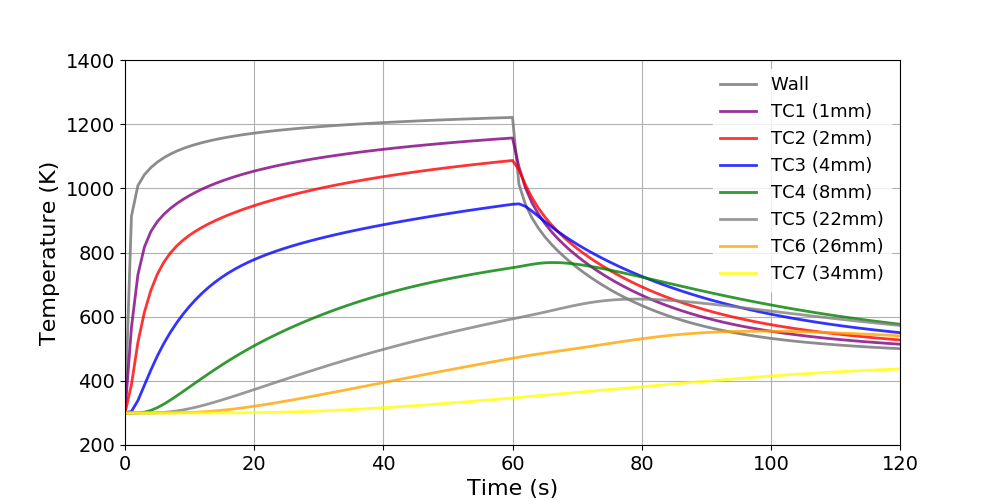
Thermal response including in-depth oxidation
AblationTestCase_2.x_multiMat
The AblationTestCase_2.x_multiMat tutorial computes the 1D thermal response of 1 porous and 2 non-porous materials. Listing [lis:2.x_multiMat1] shows the regionProperties file that selects the 3 different materials: porousMat, subMat1 and subMat2. Table 1.5 shows the summary of the subMat1 material sub-models used in this case. Listing [lis:2.x_multiMat] shows the subMat1Properties file and the different user material sub-models.
regions (solid (porousMat subMat1 subMat2));
Model/Tutorial |
AblationTestCase_2.x_multiMat |
|---|---|
Energy |
|
Material Properties |
Energy {
  EnergyType PureConduction;
}
MaterialProperties {
  MaterialPropertiesType Fourier;
  MaterialPropertiesDirectory
  "$PATO_DIR/data/Materials/Fourier/FourierTemplate";
}
CarbonFiberOxidation
The CarbonFiberOxidation tutorial computes the 1D in-depth oxidation of the CarbonFiberPreform material (Fig. 1.10 and 1.11). Table 1.6 shows the summary of the material sub-models used in this case. Listing [lis:carOxi] shows the porousMatProperties file and the different user material sub-models.
Model/Tutorial |
AblationTestCase_2.x_inDepthOxidation |
|---|---|
IO |
|
Material Properties |
|
Pyrolysis |
|
Mass |
|
Gas Properties |
|
Material Chemistry |
|
Volume Ablation |
|
TimeControl |
IO {
  IOType Profile;
  topPatch "top";
  bottomPatch "bottom";
  plot1DProfileList (Y[O2] Y[CO2] rho_s);
  plot1DMassLoss yes;
  probingFunctions (plotDict surfacePatchDict);
}
MaterialProperties {
  MaterialPropertiesType Porous;
  MaterialPropertiesDirectory
  "$PATO_DIR/data/Materials/Composites/CarbonFiberPreform";
  detailedSolidEnthalpies yes;
}
Pyrolysis {
  PyrolysisType LinearArrhenius;
}
Mass {
  MassType DarcyLaw_Heterogeneous;
}
GasProperties {
  GasPropertiesType FiniteRate;
}
MaterialChemistry {
  MaterialChemistryType SpeciesConservation;
  mixture Carbon_oxidation_species;
}
VolumeAblation {
  VolumeAblationType FibrousMaterialTypeA;
  energyConservation isothermal;
}
TimeControl {
  TimeControlType GradP_ChemYEqn;
  chemTransEulerStepLimiter no;
}

Temporal and in-depth profile of the solid density
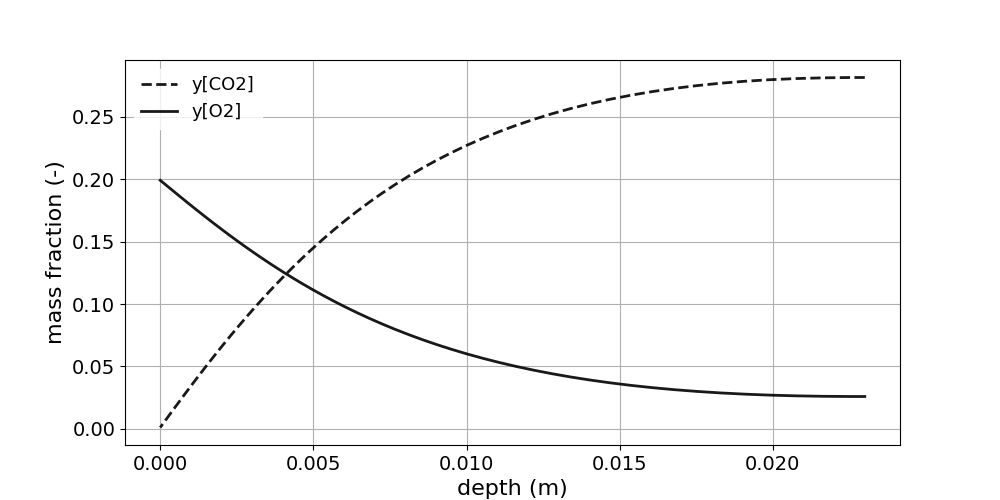
In-depth profile of the gaseous mass fractions
ELEMENTS
 C  N  O
END
SPECIES
 N2  O2  CO2  CO  C(gr)
END
REACTIONS
  C(gr) + O2 => CO2     5e7   0   28680
END
PorousStorage_1D
The PorousStorage_1D tutorial computes the 1D thermal response of a quartzite bed. The singleGraph file produces the 1D plot (Fig. 1.12). The Ta and Tg files respectively the initialization of the solid temperature field and the gazeous temperature field. Table 1.7 show the summary of the material sub-models used in this case. Listing [lis:porousStorage] shows the porousMatProperties file ans the different user material sub-models.
Model/Tutorial |
PorousStorage_1D |
|---|---|
Mass |
|
Energy |
|
IO |
|
Gas Properties |
|
Material Properties |
|
Pyrolysis |
|
TimeControl |
IO {
  writeFields (U vG);
  probingFunctions (plotDict);
}
Pyrolysis {
  PyrolysisType virgin;
}
Mass {
  MassType DarcyLaw2T;
}
Energy {
  EnergyType Pyrolysis2T;
}
GasProperties {
  GasPropertiesType Tabulated2T;
  GasPropertiesFile
  "$PATO_DIR/data/Materials/Granular/Quartzite_bed/gasProperties_with_k";
}
MaterialProperties {
  MaterialPropertiesType Porous;
  MaterialPropertiesDirectory
  "$PATO_DIR/data/Materials/Granular/Quartzite_bed";
}
TimeControl {
  TimeControlType GradP;
  chemTransEulerStepLimiter no;
}
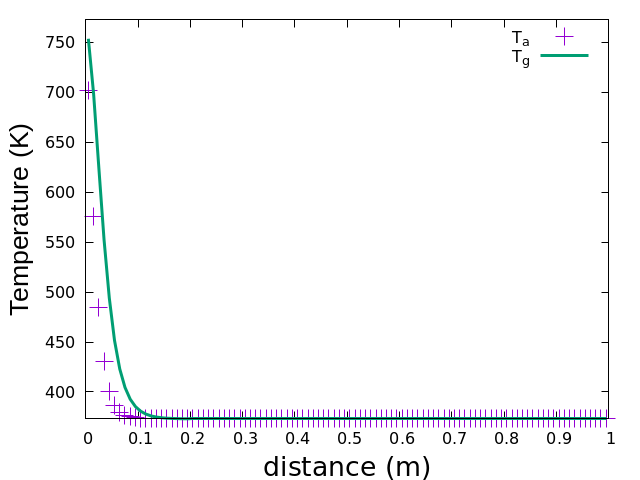
Solid and gaz temperatures at \(t = 60\) s
PureConduction
The PureConduction tutorial computes the 1D thermal response of the TACOT material using the pure conduction model. Table 1.8 shows the summary of the material sub-models used in this case. Listing [lis:pureCond] shows the porousMatProperties file and the different user material sub-models.
Model/Tutorial |
AblationTestCase_2.x_inDepthOxidation |
|---|---|
IO |
|
Energy |
|
Material Properties |
|
Pyrolysis |
IO {
  probingFunctions (plotDict surfacePatchDict);
}
Energy {
  EnergyType PureConduction;
}
MaterialProperties {
  MaterialPropertiesType PureConduction;
  MaterialPropertiesDirectory
  "$PATO_DIR/data/Materials/Composites/TACOT";
}
Pyrolysis {
  PyrolysisType virgin;
}
StartdustAtmosphericEntry
The StartdustAtmosphericEntry tutorial computes the 1D thermal response of the TACOT material using the surface mass and energy balance boundary conditions during the Stardust atmospheric entry (Fig. 1.13).
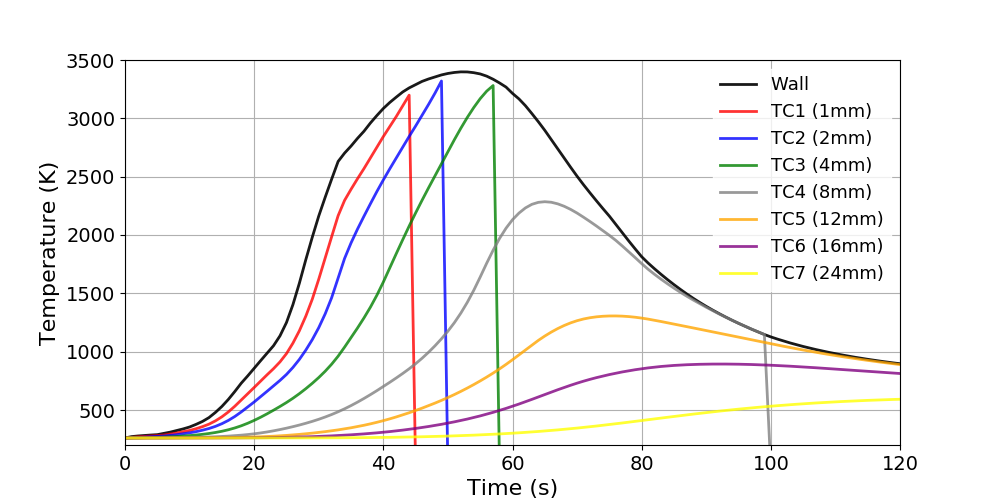
Thermal response of the Stardust atmospheric entry
WoodPyrolysis
The WoodPyrolysis tutorial computes the 1D thermal response of the Wood material (Fig. 1.14). Table 1.9 shows the summary of the material sub-models used in this case. Listing [lis:wood] shows the porousMatProperties file and the different user material sub-models.
Model/Tutorial |
WoodPyrolysis |
|---|---|
IO |
|
Pyrolysis |
|
Mass |
|
Energy |
|
Gas Properties |
|
Material Properties |
|
TimeControl |
IO {
  probingFunctions (plotDict surfacePatchDict);
}
Pyrolysis {
  PyrolysisType LinearArrhenius;
}
Mass {
  MassType DarcyLaw;
}
Energy {
  EnergyType Pyrolysis;
}
GasProperties {
  GasPropertiesType Tabulated;
  GasPropertiesFile
  "$PATO_DIR/data/Materials/Wood/Generic/gasProperties";
}
MaterialProperties {
  MaterialPropertiesType Porous;
  MaterialPropertiesDirectory
  "$PATO_DIR/data/Materials/Wood/Generic"
  detailedSolidEnthalpies yes;
}
TimeControl {
  TimeControlType GradP;
}
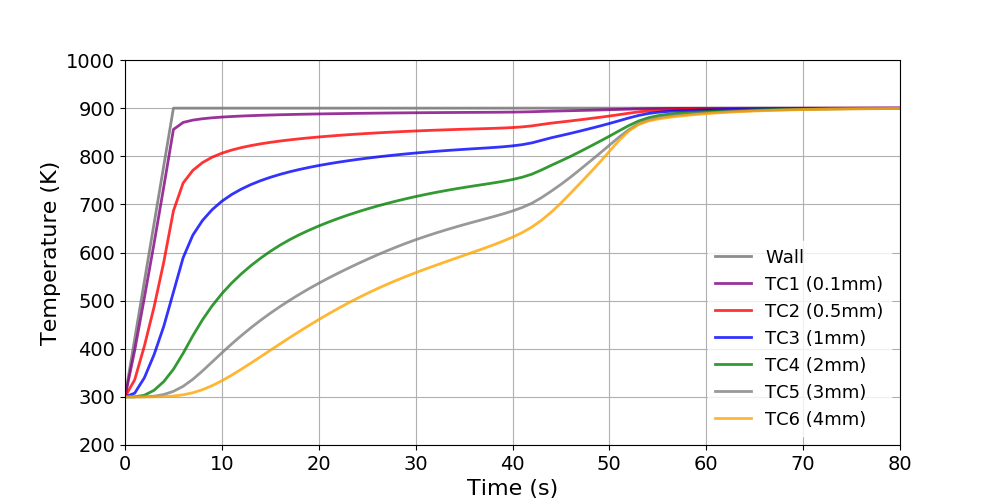
Temporal evolution of the temperature in the Wood
WoodPyrolysisCylinder1D
The WoodPyrolysisCylinder1D computes the 1D-axisymetric thermo-mechanical response of the Wood material (Fig. 1.15). Table 1.10 shows the summary of the material sub-models used in this case. Listing [lis:woodCylinder] shows the porousMatProperties file and the different user material sub-models.
Model/Tutorial |
WoodPyrolysisCylinder1D |
|---|---|
IO |
|
Pyrolysis |
|
Mass |
|
Energy |
|
Gas Properties |
|
Material Properties |
|
TimeControl |
IO {
  probingFunctions (plotDict surfacePatchDict);
   writeFields (tau D E alpha sigma epsilon);
}
Pyrolysis {
  PyrolysisType LinearArrhenius;
}
Mass {
  MassType DarcyLaw;
}
Energy {
  EnergyType Pyrolysis;
}
SolidMechanics
{
    SolidMechanicsType  Displacement;
    planeStress         true;
}
GasProperties {
  GasPropertiesType Tabulated;
  GasPropertiesFile
  "$PATO_DIR/data/Materials/Wood/GenericUNC/gasProperties";
}
MaterialProperties {
  MaterialPropertiesType Porous;
  MaterialPropertiesDirectory
  "$PATO_DIR/data/Materials/Wood/GenericUNC"
  detailedSolidEnthalpies yes;
}
TimeControl {
  TimeControlType GradP;
}
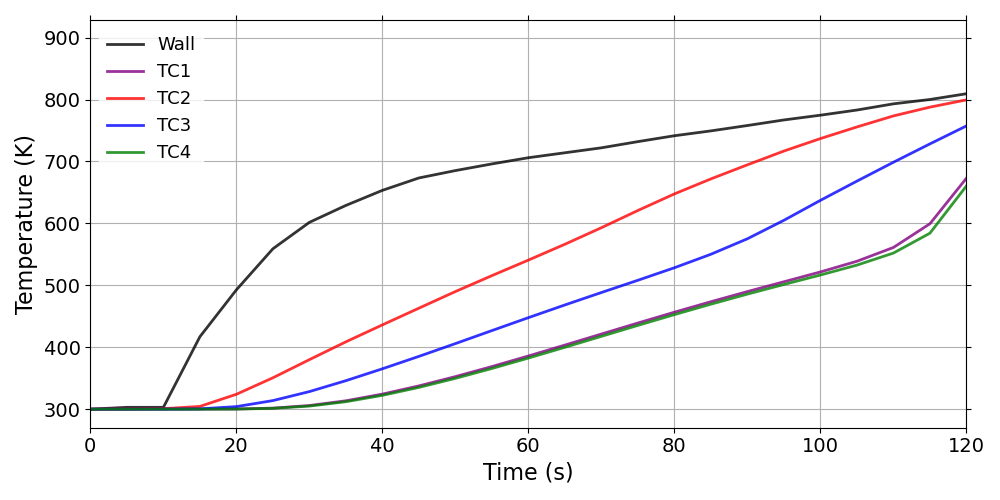
Temporal evolution of the temperature in the Wood
2D tutorials
Figure 1.16 shows the architecture of the 2D tutorials. The inputs and expected outputs of the 2D tutorials are described below.
AblationTestCase_3.x
The AblationTestCase_3.x tutorial computes the 2D thermal response of the TACOT material (Fig. 1.17 and 1.18). Listing [lis:3.x] shows the pressure boundary field of 2D-axi_pressureMap type. Listing [lis:3.x_2] and [lis:3.x_3] show examples of the fluxFactorMap and BoundaryConditions files. The pressure boundary field values follow the Equation [eq:pxt] during the first 0.1 s at a distance up to 70 \(\mu\)m from fluxFactorCenter in the fluxFactorNormal direction.
boundaryField{
    top {
        type boundaryMapping;
        mappingType "2D-axi_pressureMap";
        mappingFileName
        "constant/porousMat/BoundaryConditions";
        mappingFields ((p  "1"));
        fluxFactorNormal (0 -1 0);
        fluxFactorCenter (0.0 0.1 0.0);
        fluxFactorProjection no;
        fluxFactorMapFileName
        "constant/porousMat/fluxFactorMap";
        dynamicPressureFieldName p_dyn;
        pointMotionDirection (0 -1 0);
        fluxFactorThreshold
        fluxFactorThreshold [ 0 0 0 0 0 0 0 ] 0.97;
        value uniform 405.3;
    }
}
// t(s)   p_total_w(Pa)
    0       405.3
    0.1     10132.5
//  d(m)        fluxFactor      pressureFactor
    0               1               1
    0.00007         1               0.998
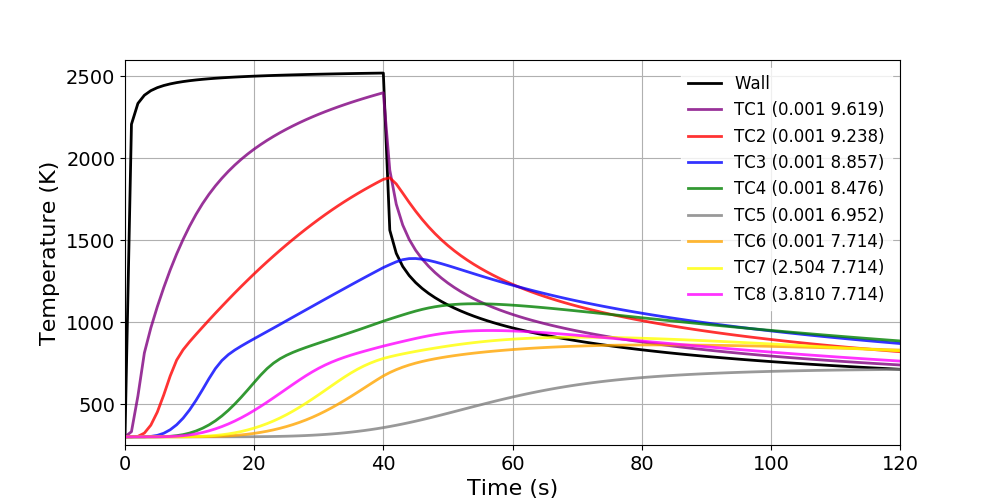
Thermal response of the AblationTestCase_3.x
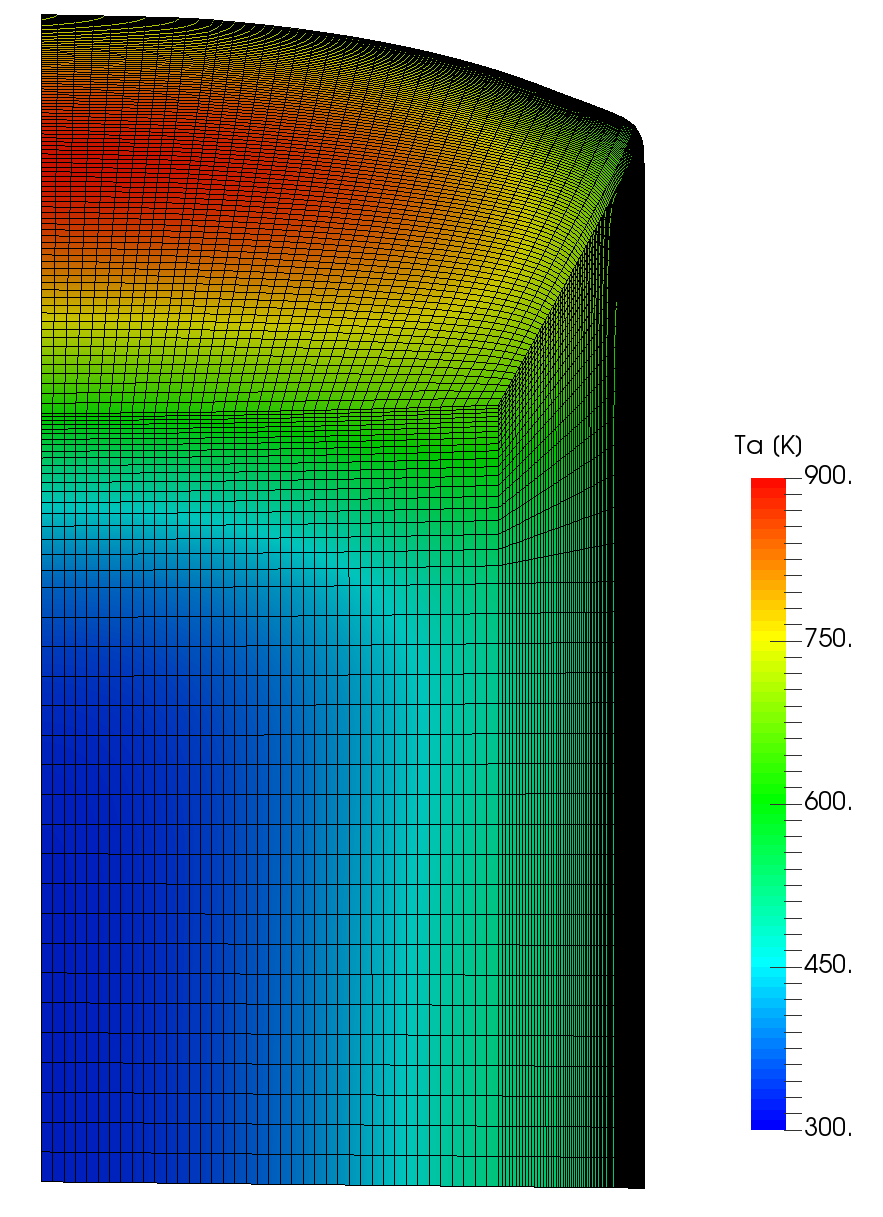
2D Ta profile of the AblationTestCase_3.x (120 s)
AblationTestCase_3.x_multiMat
The AblationTestCase_3.x_multiMat tutorial computes the 2D thermal response of 1 porous and 1 non-porous materials. Listing [lis:3.x_multiMat1] shows the regionProperties file that selects the 2 different materials: porousMat and subMat1 (Fig. 1.19). Table 1.11 shows the summary of the subMat1 material sub-models used in this case. Listing [lis:3.x_multiMat] shows the subMat1Properties file and the different user material sub-models. Listing [lis:3.x_multiMat_2] shows the temperature boundary field of “radiative” type (subsection [subsec:BC:radiative]). The radiative heat flux (\(q_{rad} = 0\) W \(\cdot\) m\(^{-2}\)) and the background temperature (\(T_\infty = 300\) K) are constant during the simulation. The heat transfer coefficient and the recovery enthalpy varies linearly over time following the BoundaryConditions file.
regions (solid (porousMat subMat1));
Model/Tutorial |
AblationTestCase_3.x_multiMat |
|---|---|
Energy |
|
Material Properties |
Energy {
  EnergyType PureConduction;
}
MaterialProperties {
  MaterialPropertiesType Fourier;
  MaterialPropertiesDirectory
  "$PATO_DIR/data/Materials/Fourier/FourierTemplate";
}
boundaryField {
    top {
        type radiative;
        mappingType constant;
        mappingFileName
        "constant/subMat1/BoundaryConditions";
        mappingFields ((rhoeUeCH "1") (h_r "2")
        );
        qRad 0;
        Tbackground 300;
        value uniform 300;
    }
}
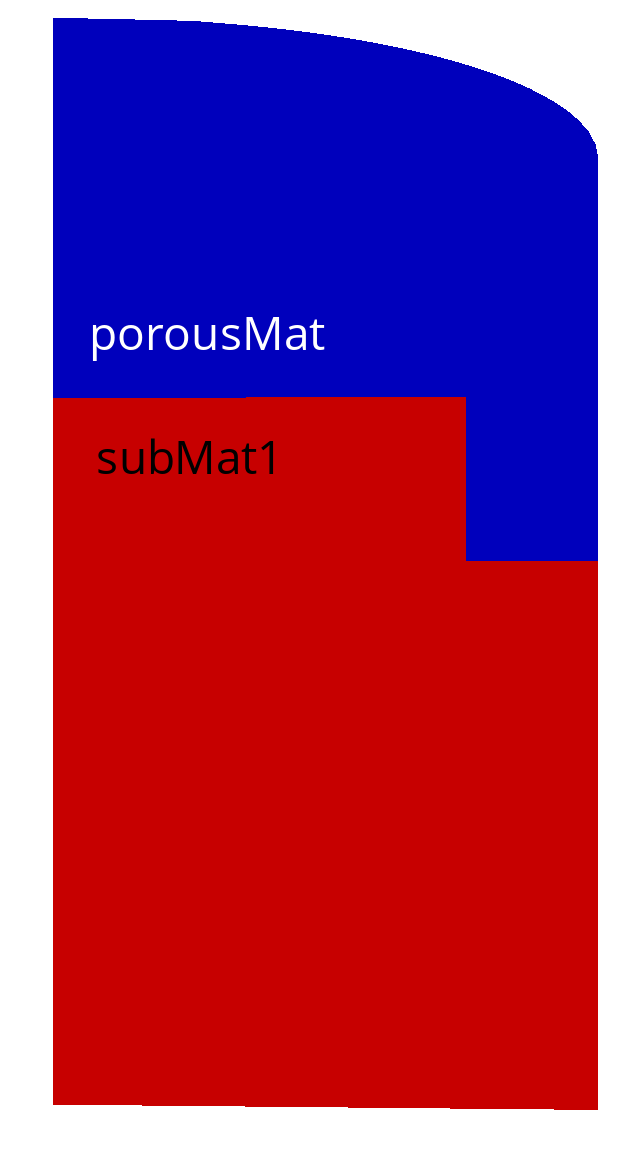
Regions of the AblationTestCase_3.x_multiMat
ArcJet_cylinder
The ArcJet_cylinder tutorial computes the 2D thermal response of the TACOT material (Fig. 1.20). This case uses the same inputs than .

2D Ta profile of the Arcjet_cylinder (120 s)
DemiseTestCase_1.0
The DemiseTestCase_1.0 tutorial computes the 2D axisysmetric thermal response of AISI 316L stainless steel mounted on a cork material (Fig. 1.21 and 1.22). Listing [lis:Demise1.0] shows the temperature coupling boundary condition inside the demiseMat. Table 1.12 shows the summary of the demiseMat material sub-models used in this case. Table 1.13 presents the summary of the porousMat material submodels.
boundaryField{
  demiseMat_to_porousMat
  {
    type            compressible::turbulentTemperatureCoupledBaffleMixed;
    value           uniform 310;
    Tnbr        Ta;
    kappaMethod     lookup;
    kappa           k_abl_sym;
  }
}
Model/Tutorial |
DemiseTestCase_1.0: demiseMat |
|---|---|
IO |
|
Energy |
|
Material Properties |
Model/Tutorial |
DemiseTestCase_1.0: porousMat |
|---|---|
IO |
|
Pyrolysis |
|
Mass |
|
Energy |
|
Gas Properties |
|
Material Properties |
|
TimeControl |

Thermal response of the DemiseTestCase_1.0

2D Ta profile of the DemiseTestCase_1.0 (276 s)
DemiseTestCase_1.0_coupled_constantFluidThermo
The DemiseTestCase_1.0_coupled_constantFluidThermo tutorial computes the 2D axisymetric thermal response of AISI 316L stainless steel protected by a silicon carbide cap and a porous cork holder inside the hot gas flow (Fig. 1.23 and 1.24). Listing [lis:Demise1.0coupled] shows the temperature coupling boundary condition between the demise material and the hot gas flow. Listing [lis:demiseSetCase] presents the setCase file. Tables 1.14, 1.15, and 1.16 shows the summary of the ceramicMat, demiseMat, and porousMat respectively.
boundaryField{
  demiseMat_to_hotFlow
  {
    type            compressible::turbulentTemperatureRadCoupledMixed;
    Tnbr            T;
    kappaMethod     lookup;
    kappa       k_abl_sym;
    QrNbr           none;
    Qr              Qr;
    value           uniform 310;
  }
}
fluidType chtMultiRegionFoam;
Model/Tutorial |
DemiseTestCase_1.0_coupled_constantFluidThermo: ceramicMat |
|---|---|
IO |
|
Energy |
|
Material Properties |
Model/Tutorial |
DemiseTestCase_1.0_coupled_constantFluidThermo: demiseMat |
|---|---|
IO |
|
Energy |
Model/Tutorial |
DemiseTestCase_1.0_coupled_constantFluidThermo: porousMat |
|---|---|
IO |
|
Pyrolysis |
|
Mass |
|
Energy |
|
Gas Properties |
|
Material Properties |
|
TimeControl |
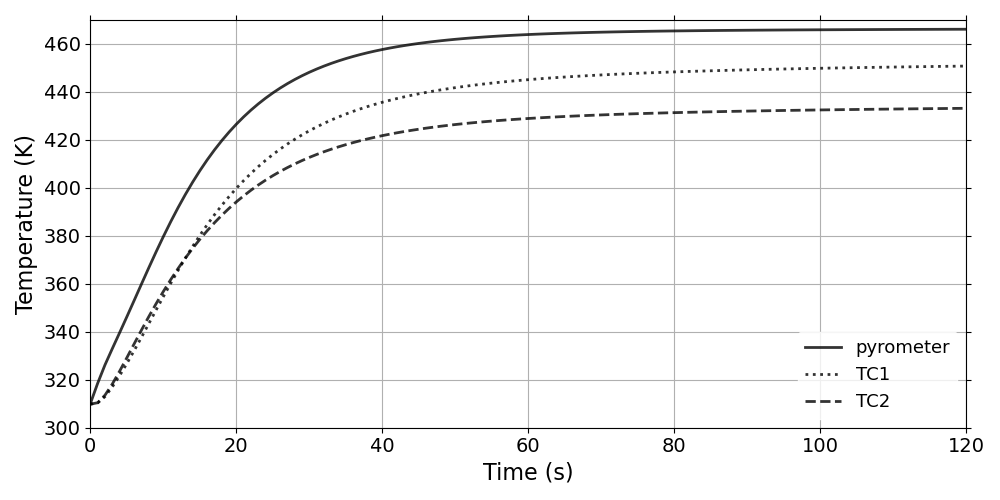
Thermal response of the DemiseTestCase_1.0_coupled_constantFluidThermo
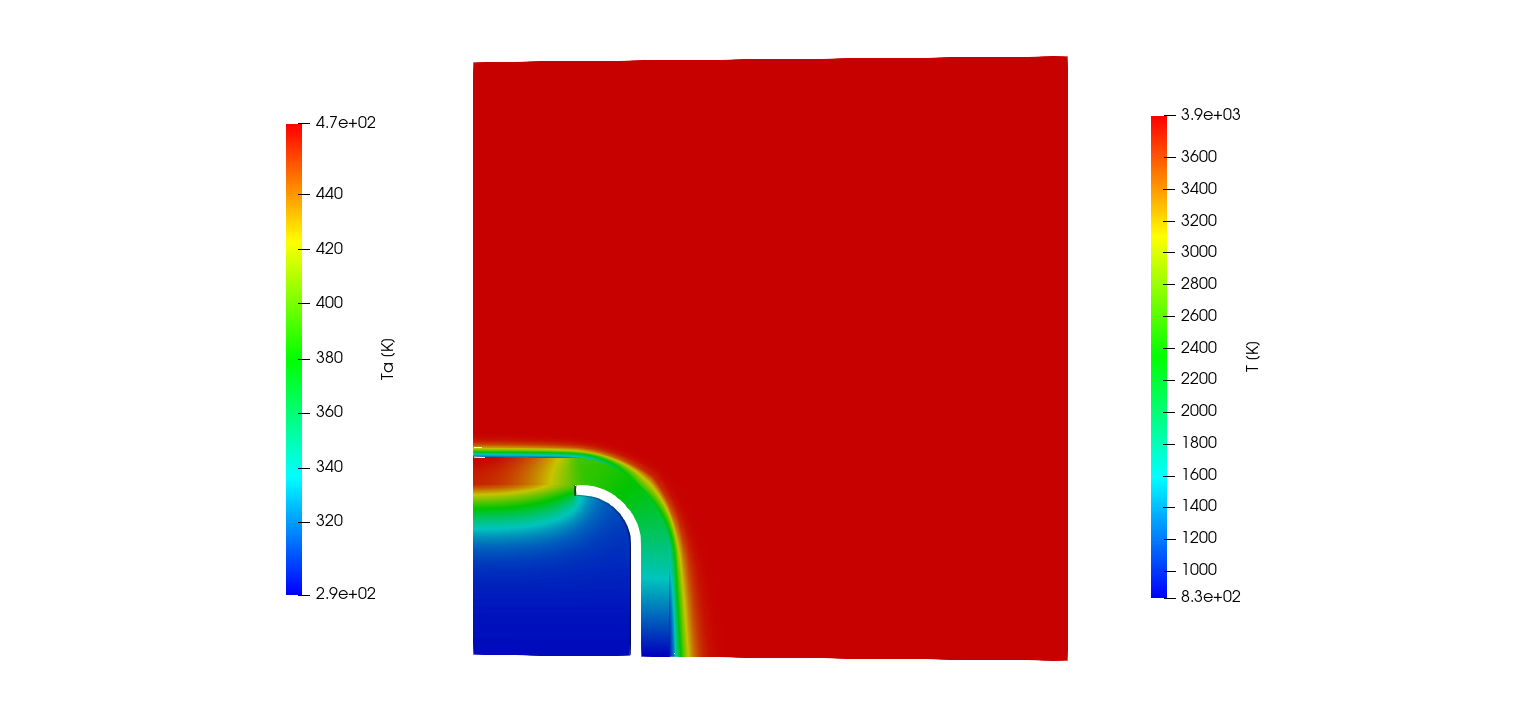
2D Ta profile of the DemiseTestCase_1.0_coupled_constantFluidThermo (120 s)
DemiseTestCase_1.0_coupled_equilibriumFluidChemistry
thermoType {
  type            heRhoThermo;
  mixture         pureMixture;
  transport       tabular;
  thermo          hTabular;
  equationOfState Rhotabular;
  specie          specie;
  energy          sensibleEnthalpy;
}

mixture {
  specie
  {
    nMoles          1;
    molWeight       28.96;
  }

  equationOfState
  {
    file "$PATO_DIR/data/Fluids/fluidPropertyTable/Air5/Equilibrium/densityTable";
    outOfBounds clamp;
  }

  thermodynamics
  {
    Hf 0;
    Cp
    {
      file "$PATO_DIR/data/Fluids/fluidPropertyTable/Air5/Equilibrium/cpTable";
      outOfBounds clamp;
    }
    h
    {
      file "$PATO_DIR/data/Fluids/fluidPropertyTable/Air5/Equilibrium/hTable";
      outOfBounds clamp;
    }
  }

  transport
  {
    mu
    {
      file "$PATO_DIR/data/Fluids/fluidPropertyTable/Air5/Equilibrium/muTable";
      outOfBounds clamp;
    }

    kappa
    {
      file "$PATO_DIR/data/Fluids/fluidPropertyTable/Air5/Equilibrium/kappaTable";
      outOfBounds clamp;
    }
  }
}

Thermal response of the DemiseTestCase_1.0_coupled_equilibriumFluidChemistry
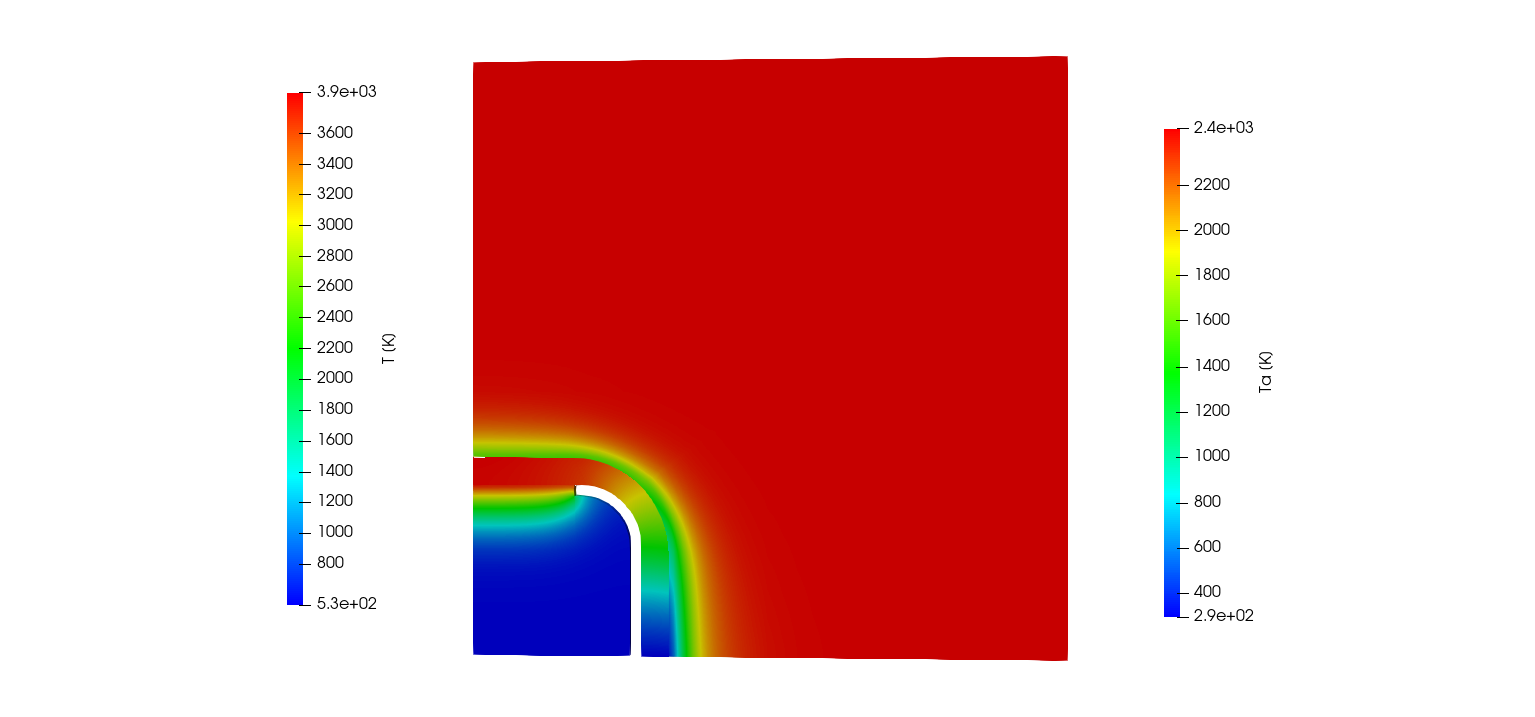
2D Ta profile of the DemiseTestCase_1.0_coupled_equilibriumFluidChemistry (120 s)
DemiseTestCase_1.0_coupled_frozenFluidChemistry
The DemiseTestCase_1.0_coupled_frozenFluidChemistry tutorial computes the 2D axisymetric thermal response of AISI 316L stainless steel protected by a silicon carbide cap and a porous cork holder inside the chemically frozen hot gas flow (Fig. 1.27 and 1.28).
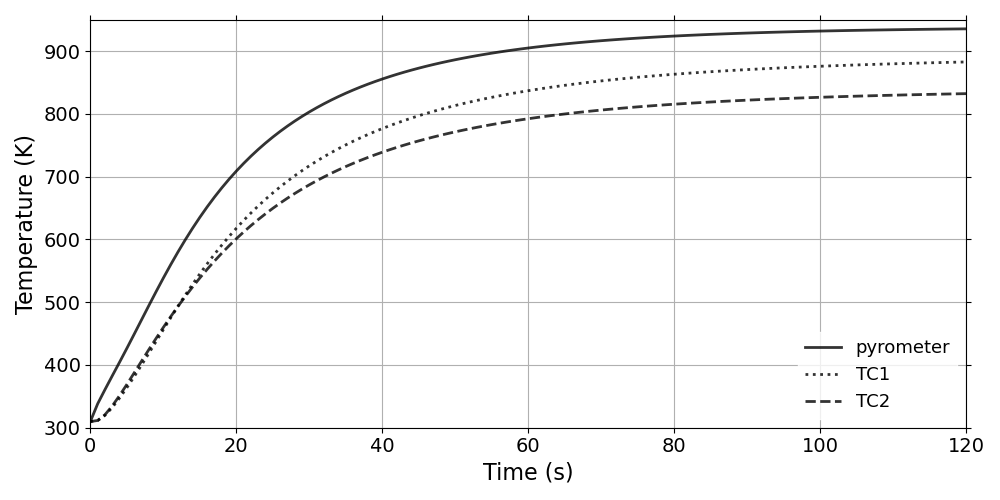
Thermal response of the DemiseTestCase_1.0_coupled_frozenFluidChemistry
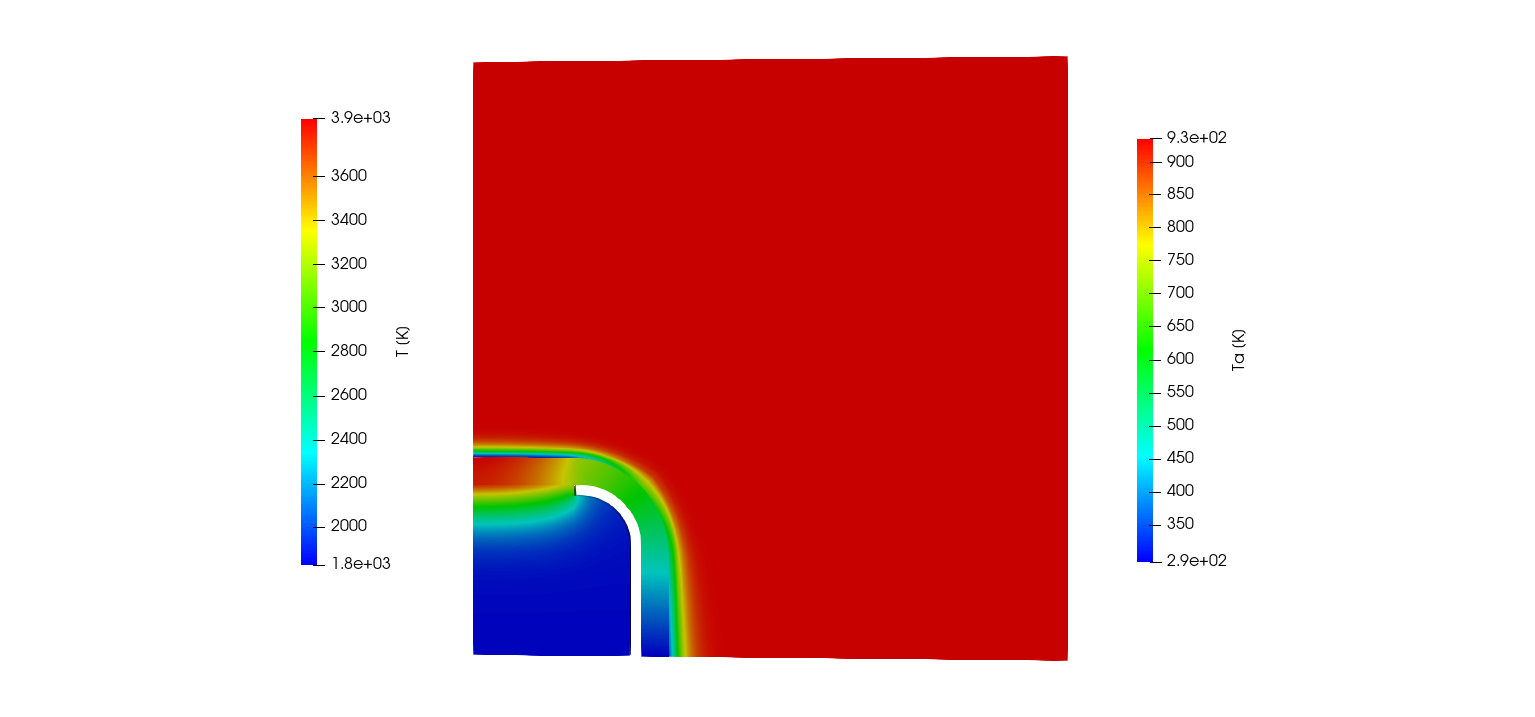
2D Ta profile of the DemiseTestCase_1.0_coupled_frozenFluidChemistry (120 s)
FlappingConsole
boundaryField{
    fluid_to_solid
    {
        type            codedFixedValue;
        value           uniform (0 0 0);
        name            solidfollowing;
        code
        #{
            vectorField n(this->patch().nf());
            scalar deltaT = this->db().time().deltaTValue();
            const mappedPatchBase& mpp =
                refCast<const mappedPatchBase>(this->patch().patch());
            const polyMesh& nbrMesh = mpp.sampleMesh();

            const label samplePatchI = mpp.samplePolyPatch().index();
            const fvPatch& nbrPatch =
                refCast<const fvMesh>(nbrMesh).boundary()[samplePatchI];

            const fvPatchField<vector>& nbrField =
                nbrPatch.lookupPatchField
                <
                    GeometricField<vector, fvPatchField, volMesh>,
                    vector
                >
                ("deltaD");

            tmp<Field<vector>> nbrIntFld
            (
                new Field<vector>(nbrField.size(), pTraits<vector>::zero)
            );
            nbrIntFld.ref() = nbrField.patchInternalField();
            vectorField deltaD = nbrIntFld.ref();
            operator==(deltaD/deltaT);
        #};

        codeInclude
        #{
            #include "mappedPatchBase.H"
        #};

        codeOptions
        #{
            -I$(LIB_SRC)/meshTools/lnInclude
        #};
    }
}
boundaryField{
    fluid_to_solid
    {
        type            codedFixedValue;
        value           uniform (0 0 0);
        name            solidfollowing;
        code
        #{
            vectorField n(this->patch().nf());
            scalar deltaT = this->db().time().deltaTValue();
            const mappedPatchBase& mpp =
                refCast<const mappedPatchBase>(this->patch().patch());
            const polyMesh& nbrMesh = mpp.sampleMesh();

            const label samplePatchI = mpp.samplePolyPatch().index();
            const fvPatch& nbrPatch =
                refCast<const fvMesh>(nbrMesh).boundary()[samplePatchI];

            const fvPatchField<vector>& nbrField =
                nbrPatch.lookupPatchField
                <
                    GeometricField<vector, fvPatchField, volMesh>,
                    vector
                >
                ("deltaD");

            tmp<Field<vector>> nbrIntFld
            (
                new Field<vector>(nbrField.size(), pTraits<vector>::zero)
            );
            nbrIntFld.ref() = nbrField.patchInternalField();
            vectorField deltaD = nbrIntFld.ref();
            operator==(deltaD/deltaT);
        #};

        codeInclude
        #{
            #include "mappedPatchBase.H"
        #};

        codeOptions
        #{
            -I$(LIB_SRC)/meshTools/lnInclude
        #};
    }
}
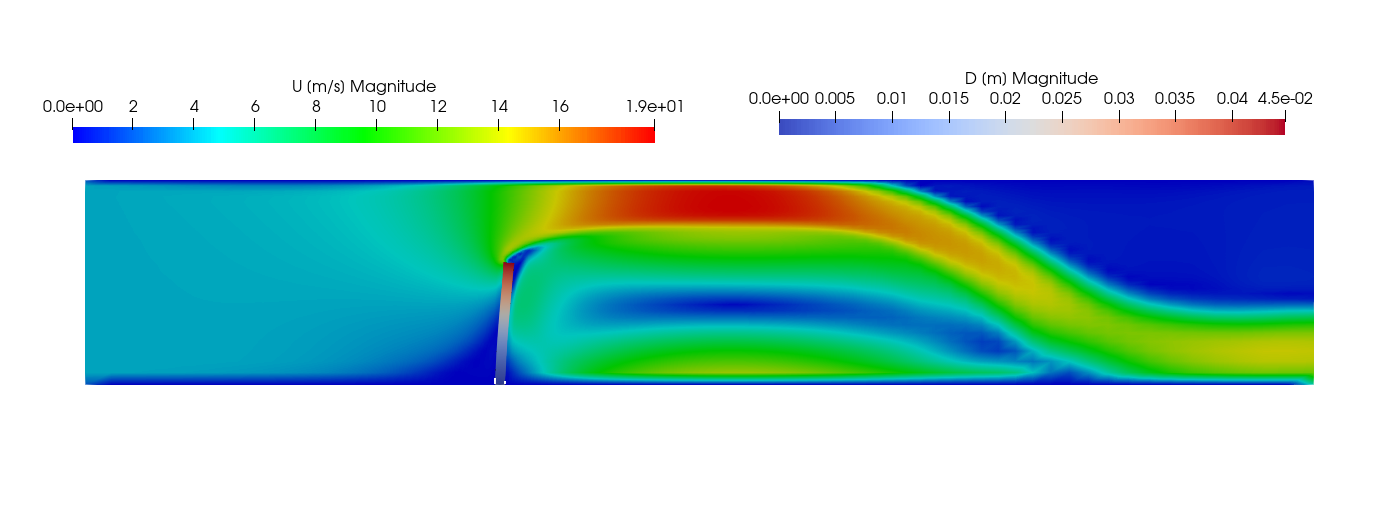
Velocity of the fluid and displacement of the solid for the FlappingConsole case.
FlowTube2T
the FlowTube2T tutorial computes the 2D thermal response of a porous medium heated by a gas flow (Fig. 1.30). Table 1.17 shows the summary of the porousMat material used in this case.
Model/Tutorial |
FlowTube2D: porousMat |
|---|---|
IO |
|
Pyrolysis |
|
Mass |
|
Energy |
|
Gas Properties |
|
Material Properties |
|
TimeControl |
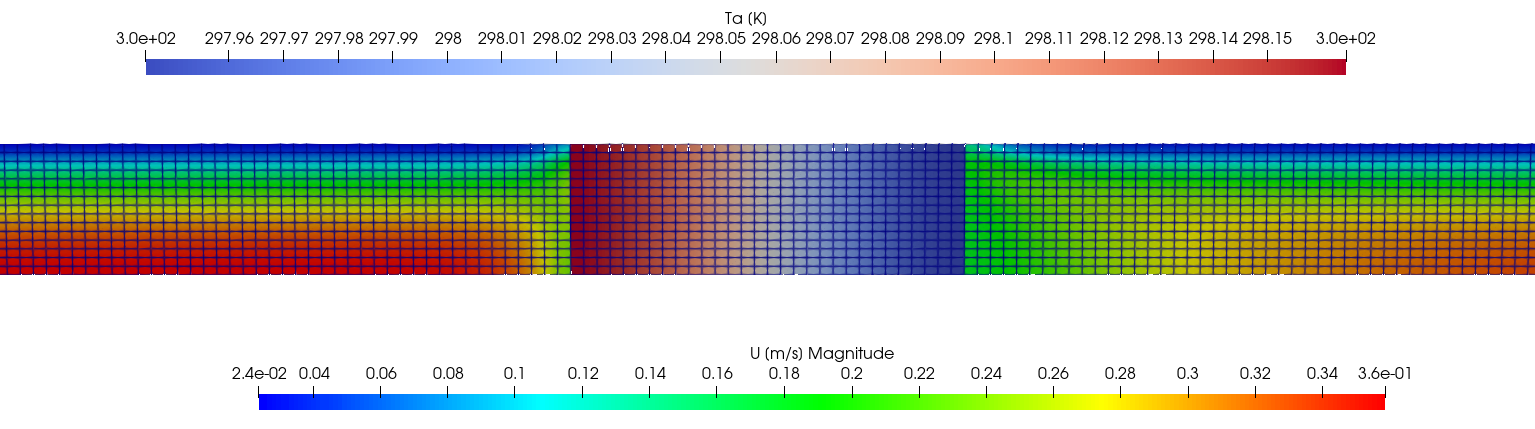
Velocity of the fluid and thermal response of the porous material for the FlowTube2T case.
ImmersedCylinder_Full_chtMultiRegionFoam
boundaryField{
porousMat_to_flow
  {
    type        fixedValueToNbrValue;
    nbr         p;
    value       $internalField;
  }
}
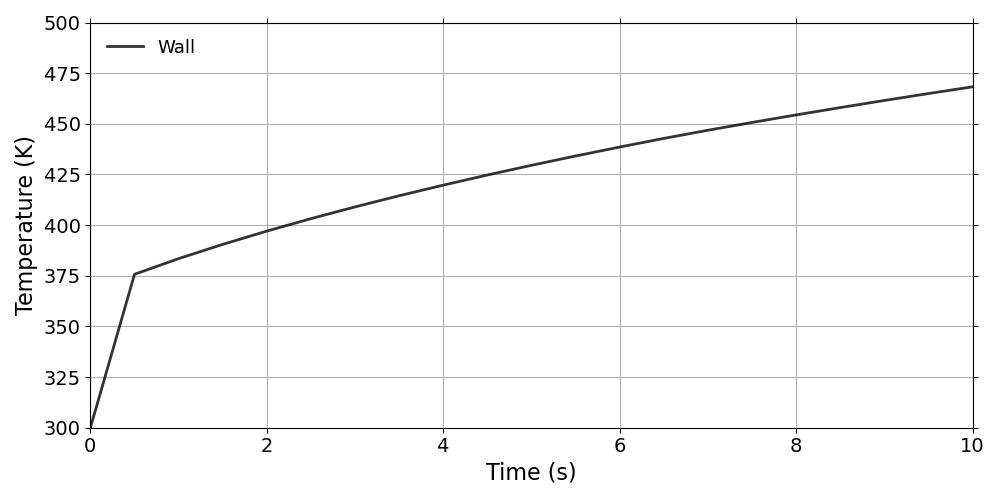
Thermal response of the ImmersedCylinder_Full_chtMultiRegionFoam
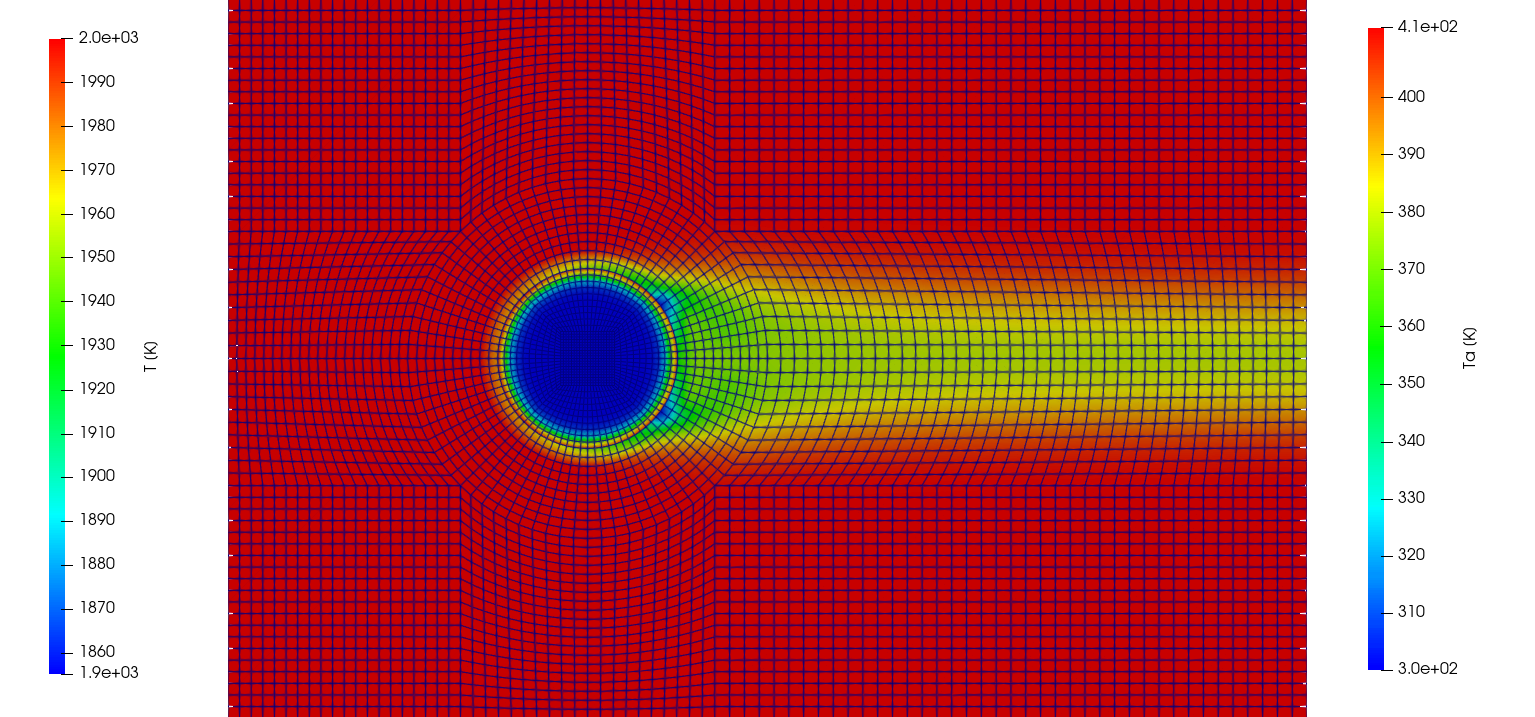
2D temperature profile of the ImmersedCylinder_Full_chtMultiRegionFoam (10 s)
ImmersedCylinder_Full_reactingFoam
thermoType {
  type            heRhoThermo;
  mixture         reactingMixture;
  transport       sutherland;
  thermo          janaf;
  energy          sensibleEnthalpy;
  equationOfState perfectGas;
  specie          specie;
}

inertSpecie CO2;

chemistryReader foamChemistryReader;

foamChemistryFile "$FOAM_CASE/constant/flow/reactions";

foamChemistryThermoFile "$FOAM_CASE/constant/flow/thermo.compressibleGas";
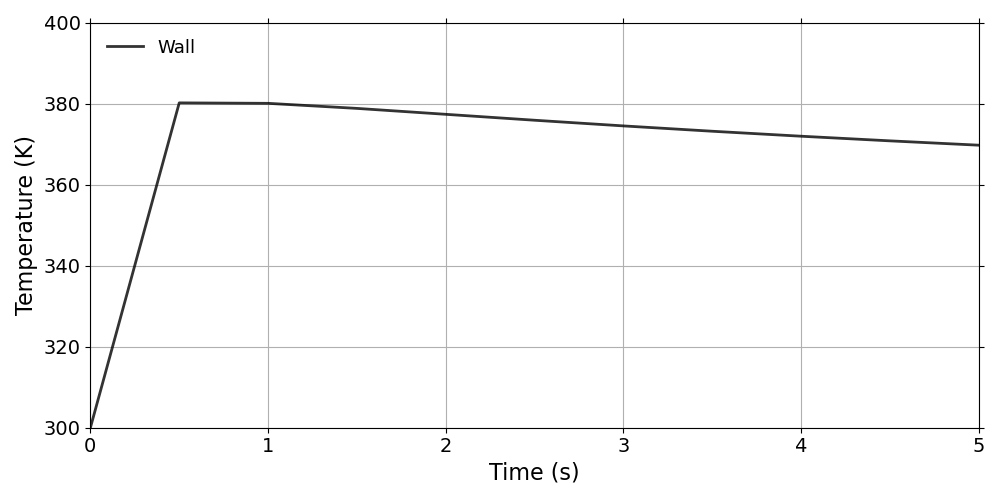
Thermal response of the ImmersedCylinder_Full_reactingFoam
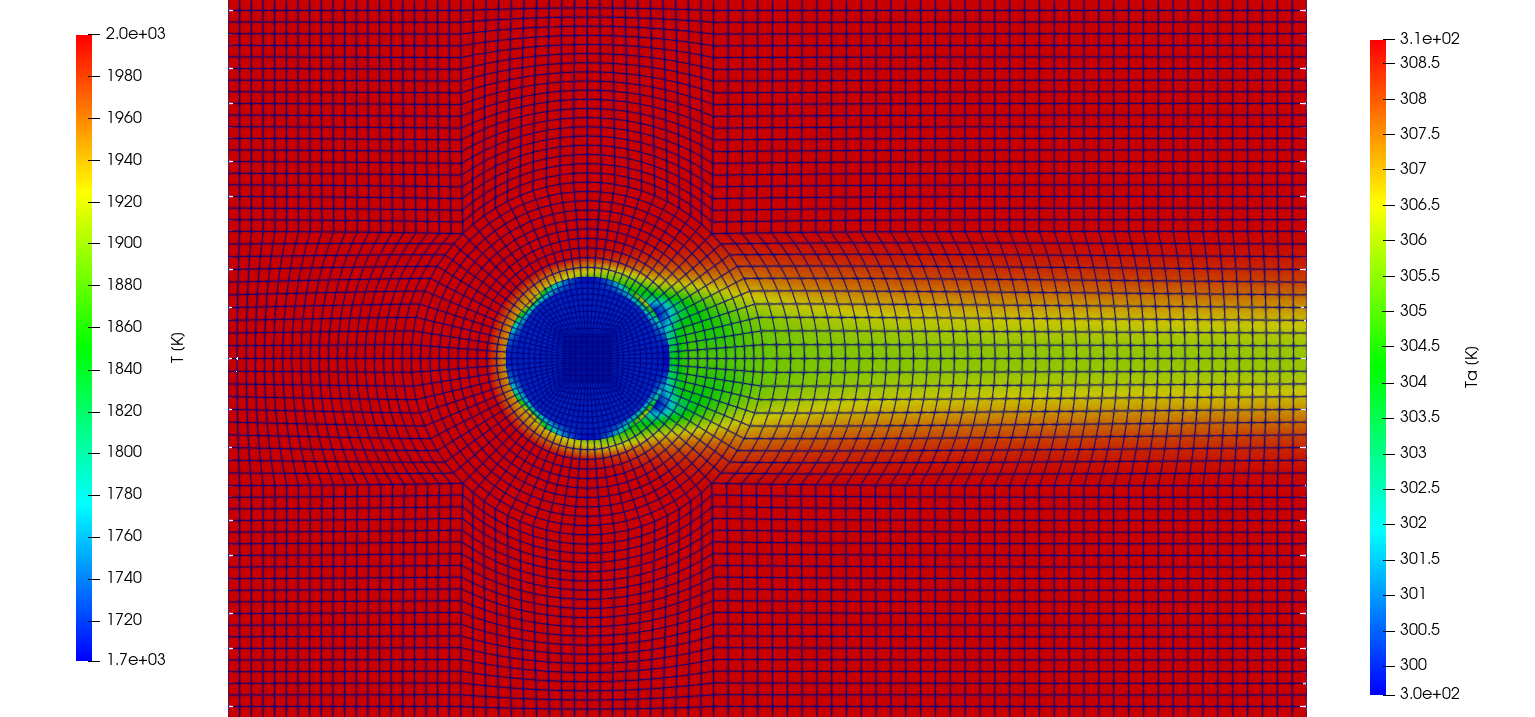
2D temperature profile of the ImmersedCylinder_Full_reactingFoam (5 s)
ImmersedCylinder_Quarter_chtMultiRegionFoam
The ImmersedCylinder_Quarter_chtMultiRegionFoam tutorial computes the 2D symmetric thermal response of TACOT material inside a hot gas flow (Fig 1.35 and 1.36).
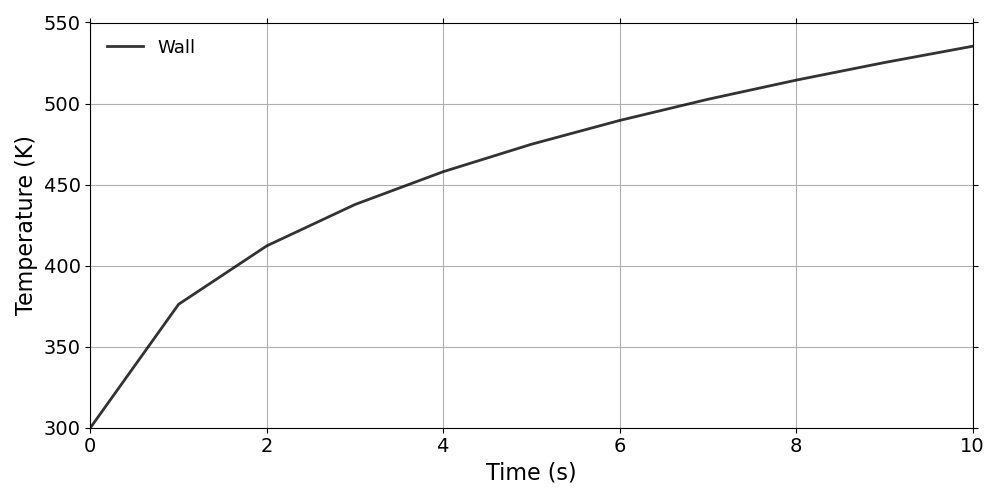
Thermal response of the ImmersedCylinder_Quarter_chtMultiRegionFoam
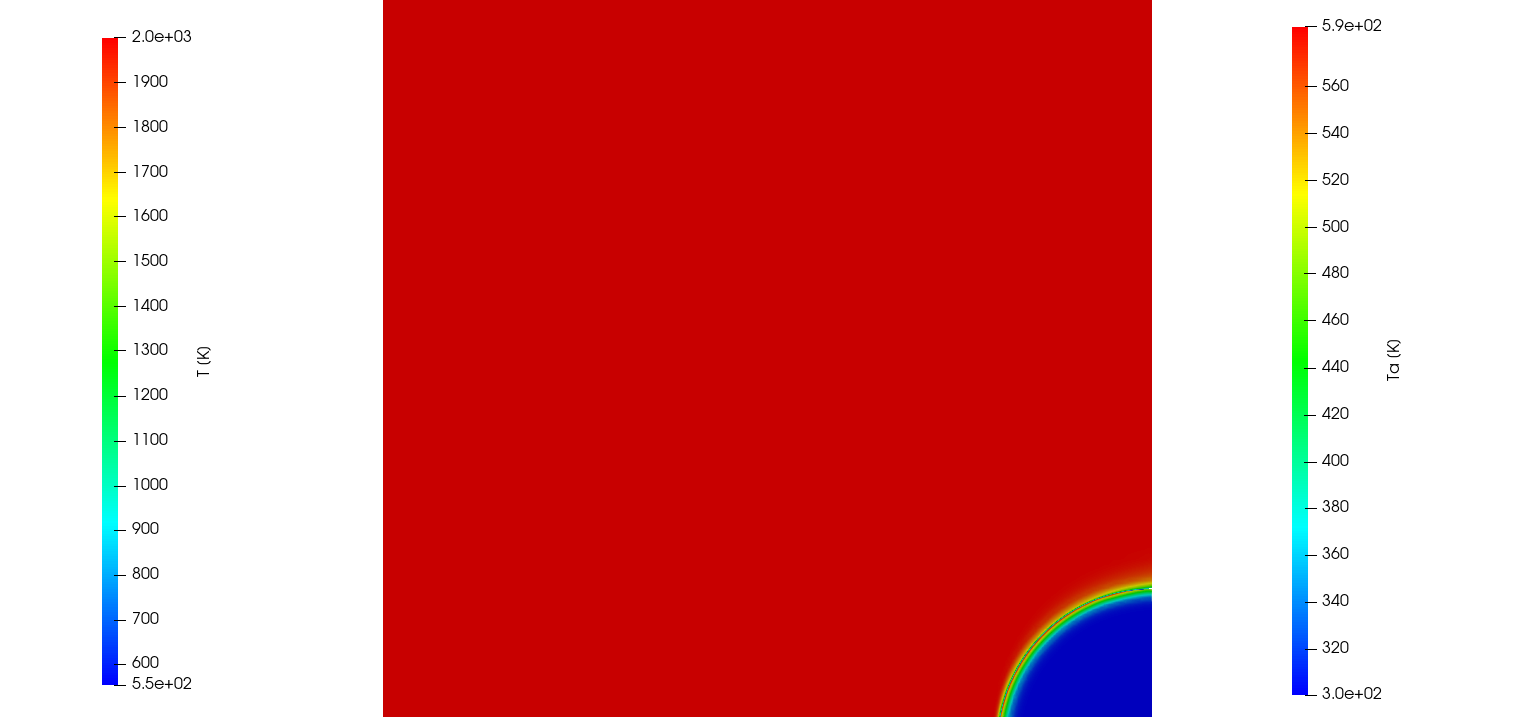
2D temperature profile of the ImmersedCylinder_Quarter_chtMultiRegionFoam (10 s)
Ma5ArcJetOnPorousFlatPlate
The Ma5ArcjetOnPorousFlatPlate computes the 2D thermal response of a plate of TACOT material inside a supersonic (\(Ma = 5\)) arc jet (Figure 1.37 and 1.38). It is possible to run simulations on each zone (fluid or porousMaterial) separately for uncoupled simulations or on both mesh simultaneously for coupled simulations. 4 Allrun files are available:
Allrun_aero: run the Mach-5 flow simulation alone on a single processor with rhoCentralFoam solver from OpenFOAM under frozen chemistry assumption.
Allrun_parallel_aero: run the Mach-5 flow simulation in parallel with rhoCentralFoam solver from OpenFOAM. The simulation takes 8 hours on 192 processors to reach the final time of 0.004 s.
Allrun_coupled_standard: run the coupled simulation using a 2 temperatures model for the porous material. The flow is initialized with a converged solution.
Allrun_coupled_stitching: run the coupled simulation with a time scale splitting strategy to speed-up convergence. This method use the experimental solver PATOxs.
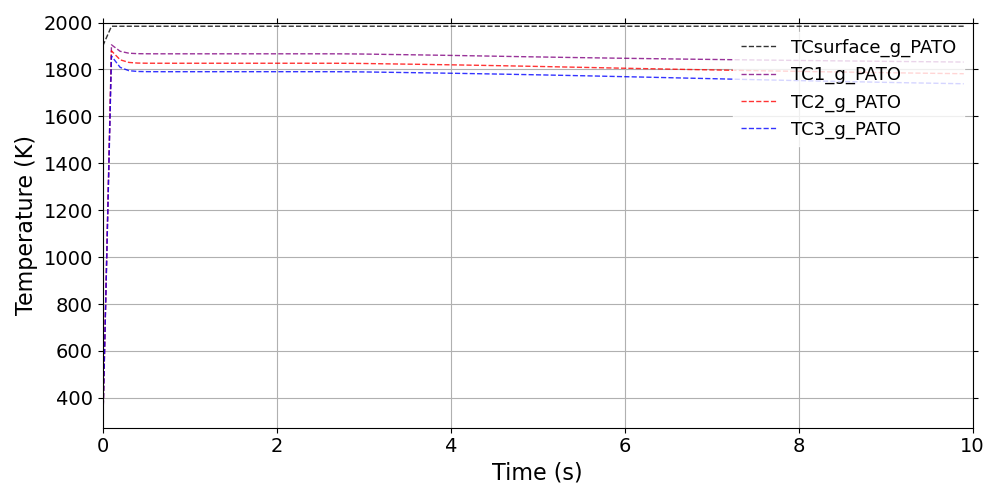
Gas thermal response of the Ma5ArcJetOnPorousFlatPlate
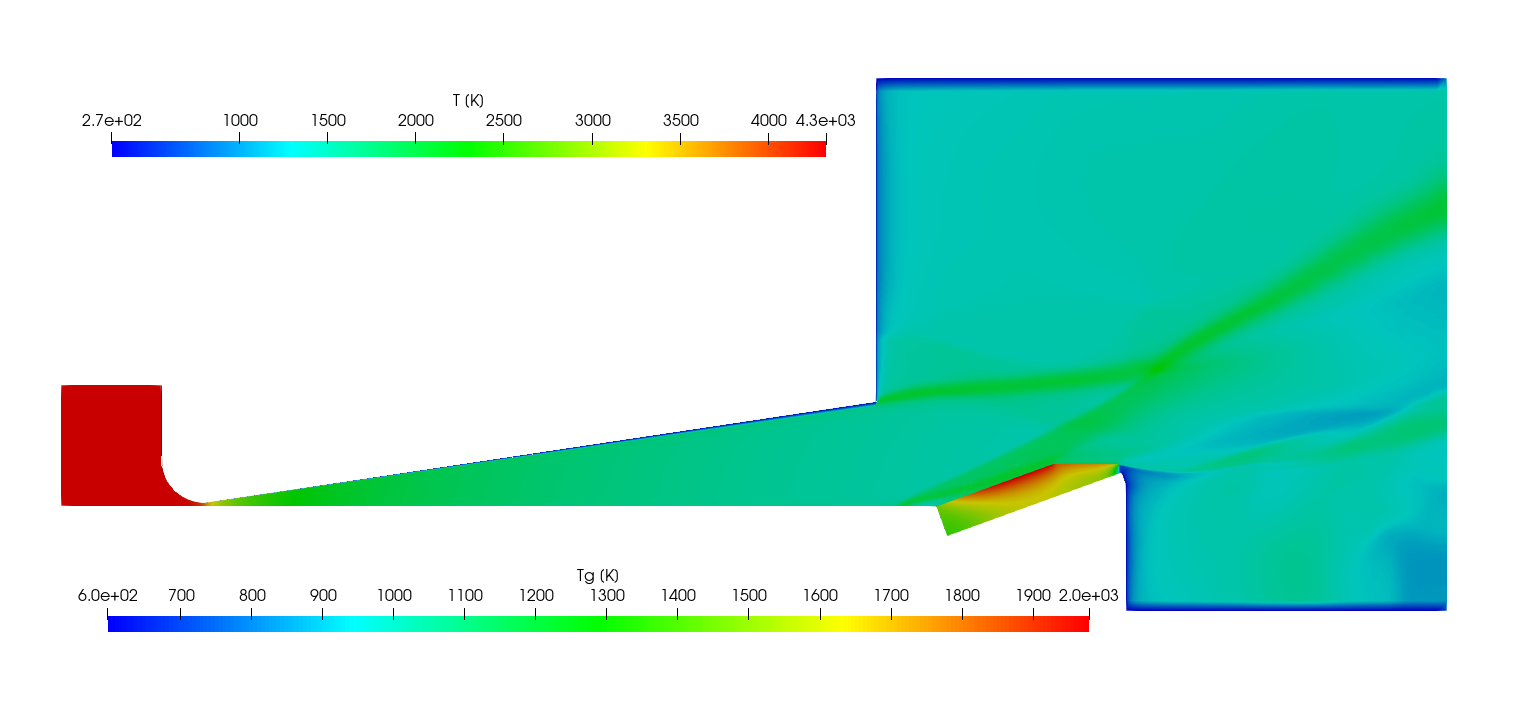
2D gas temperature profile of the Ma5ArcJetOnPorousFlatPlate
OpenCylinder
The OpenCylinder tutorial compute the 2D thermo-mechanical response of a solid cylinder (Fig 1.39 and 1.40). A computation of the analytical solution is included in the tutorial (Eq. [eq:analyticalT] to Eq. [eq:analyticalSigma]).
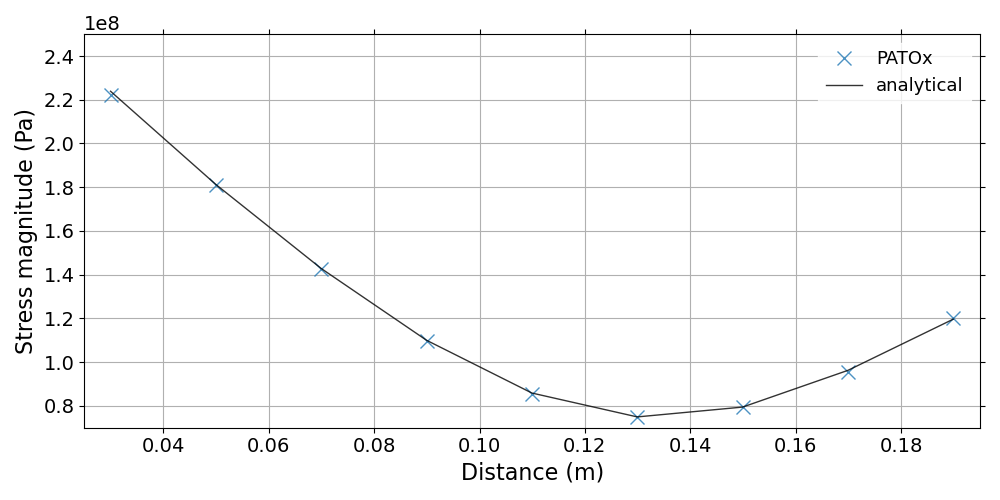
Stress response of the OpenCylinder
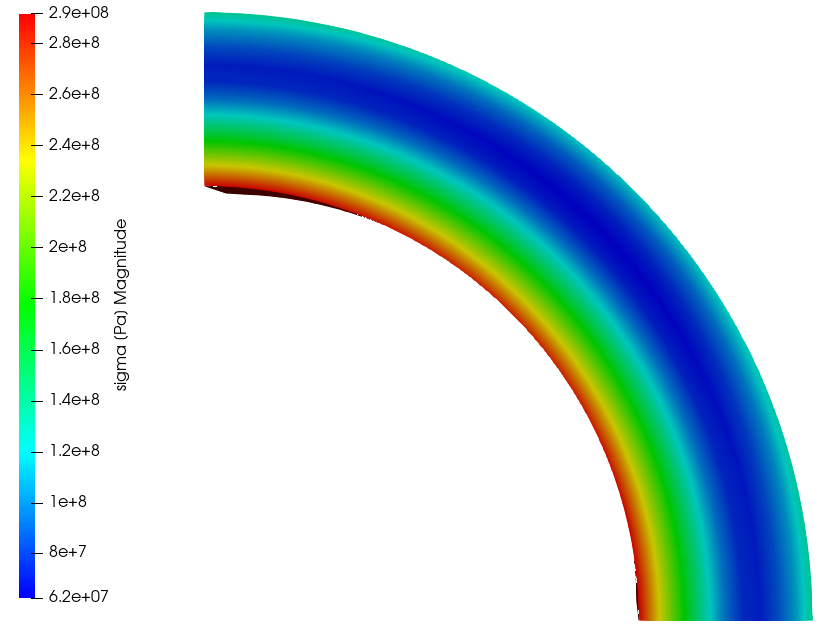
2D stress magnitude profile of the OpenCylinder
Poiseuille_flow
The Poiseuille_flow tutorial computes the 2D axisymetric, incompressible, laminar Poiseuille flow and compares it with analytical results (Fig 1.41).
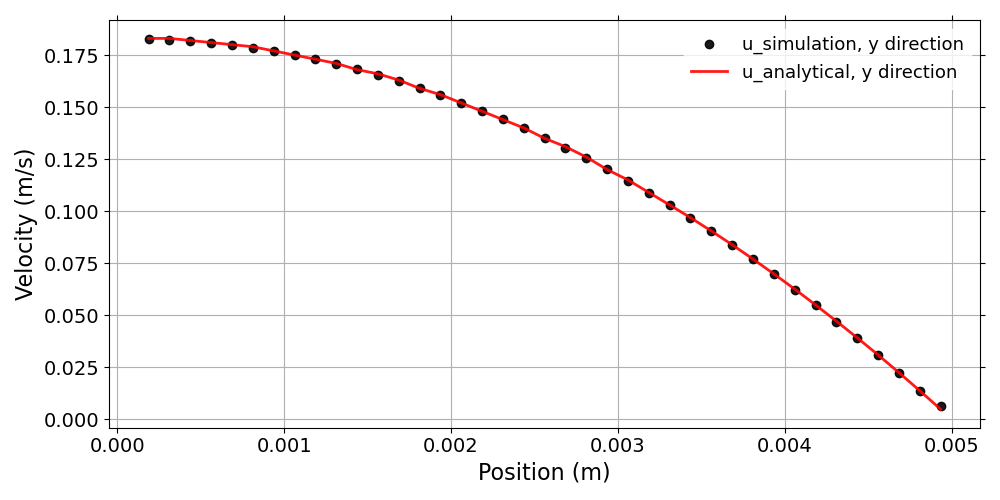
Velocity of the flow for the Poiseuille_flow tutorial
QuartziteBed_thermal_load
The QuartziteBed_thermal_load tutorial computes the 2D axisymetric thermo-mechanical response of the Quartzite bed material enclosed in a 16Mo3 steel (Fig 1.42). The 2 temperature thermal load is precalculated in the thermalLoad directory. Table 1.18 shows the summary of the porousMat material used in this case and Table 1.19 presents the summary of the tank material used in this case. Mechanical contact between the two material is not taken into account. There are only separated by difference in thermo-mechanical properties
Model/Tutorial |
QuartziteBed_thermal_load: porousMat |
|---|---|
IO |
|
Pyrolysis |
|
Material Properties |
|
SolidMechanics |
Model/Tutorial |
QuartziteBed_thermal_load: tank |
|---|---|
IO |
|
Pyrolysis |
|
Material Properties |
|
SolidMechanics |
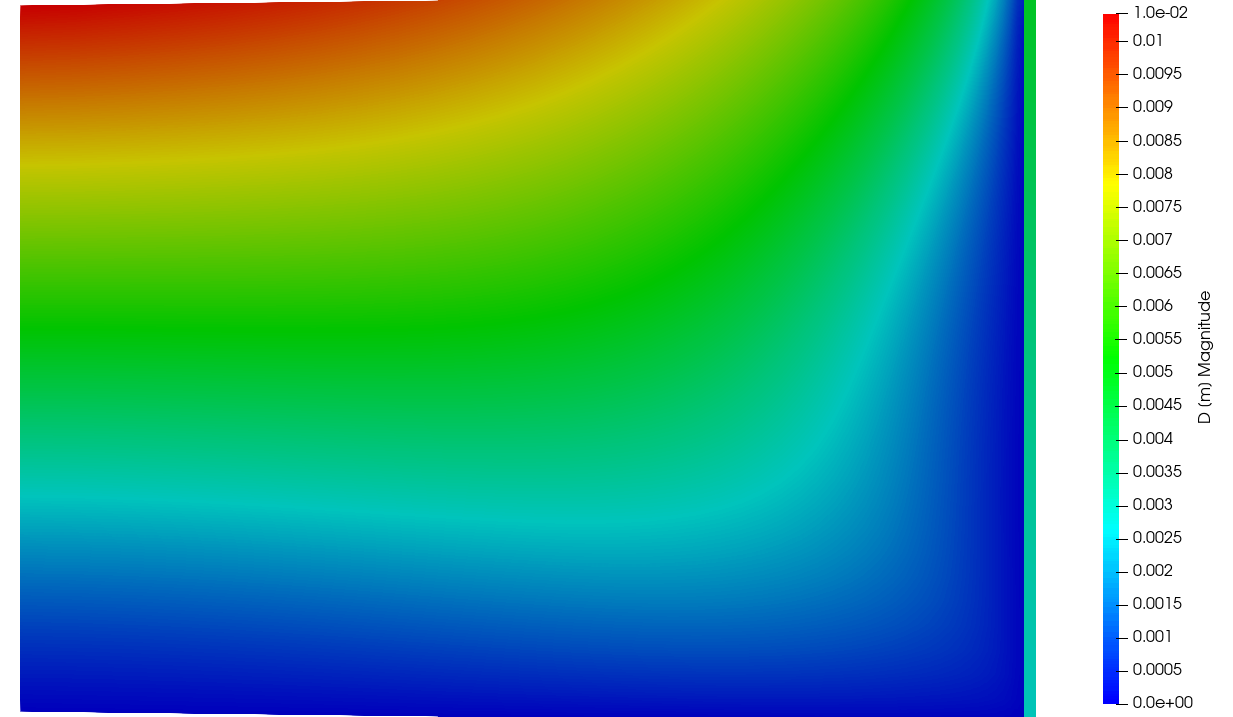
2D displacement profile of the QuartziteBed_thermal_load
TGA_standardCrucible
The TGA_standardCrucible tutorial computes the 2D thermal response of the TACOT material (Fig. 1.43). This case uses the same inputs as .
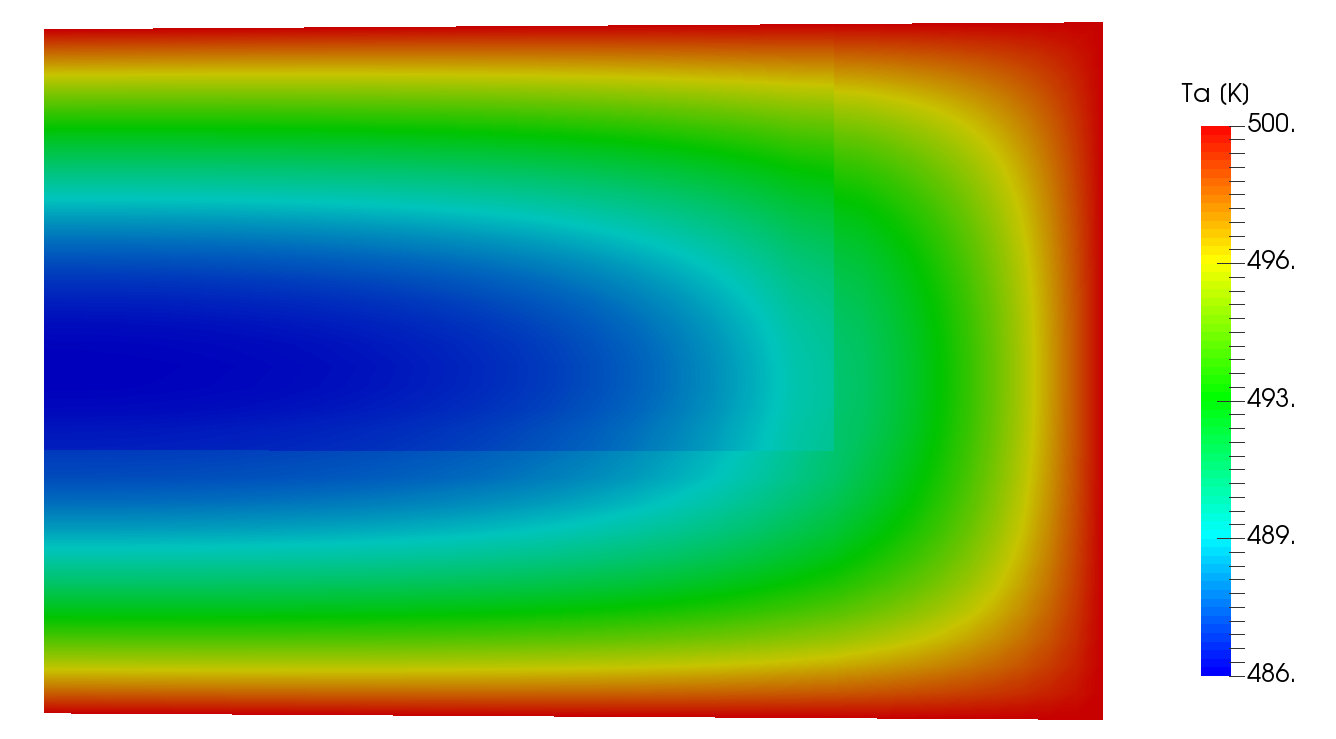
2D Ta profile of the TGA_standardCrucible (10 s)
WoodPyrolysis_cylinder
The WoodPyrolysis_cylinder tutorial computes the 2D thermal response of the TACOT material (Fig. 1.44). This case uses the same inputs as .

2D Ta profile of the WoodPyrolysis_cylinder (30 s)
3D tutorials
Figure 1.45 shows the architecture of the 3D tutorials. The inputs and expected outputs of the 3D tutorials are described below.
ArcJet_cylinder_3D
The Arcjet_cylinder_3D tutorial computes the 3D thermal response of the TACOT material (Fig. 1.46). This case uses the same inputs as .
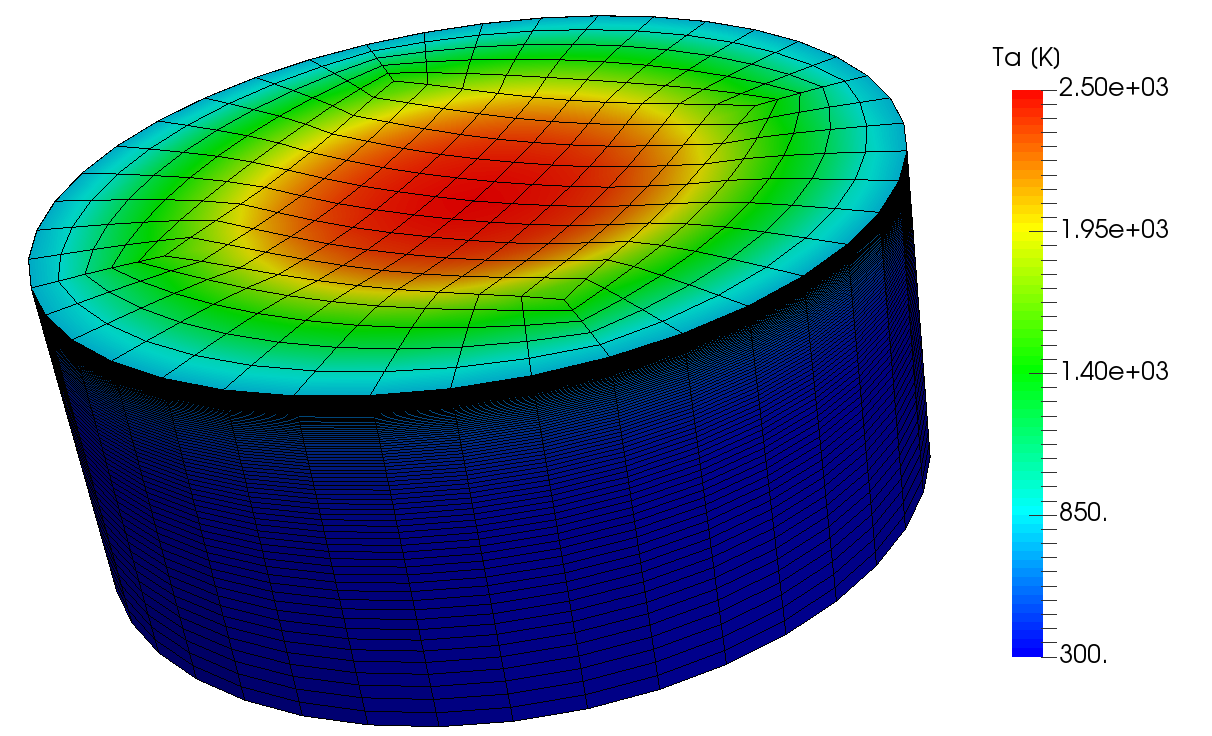
3D material response of the Arcjet_cylinder (120 s)
MSL_monolithic
The MSL_monolithic tutorial computes the 3D thermal response of the monolithic heat shield of the Mars Science Laboratory (MSL) made of TACOT material during Mars atmosphere entry (Fig. 1.47). Listing [lis:MSL] shows the temperature boundary field of BC type using the 3D-tecplot type. The pressure, the heat transfer coefficient and the recovery enthalpy are linearly interpolated from the DPLR-MSL_* Tecplot files.
boundaryField {
    top {
        type Bprime;
        BprimeFile
        "$FOAM_CASE/data/Materials/TACOT-Mars/BprimeTable";
        mappingType "3D-tecplot";
        mappingFileName
        "$FOAM_CASE/data/Environment/DPLR-MSL";
        mappingSymmetry y;
        mappingFields ((p "1") (rhoeUeCH "2") (h_r "3"));
        Tbackground 187;
        qRad 0;
        lambda 0.5;
        heatOn 1;
        value uniform 300;
    }
}
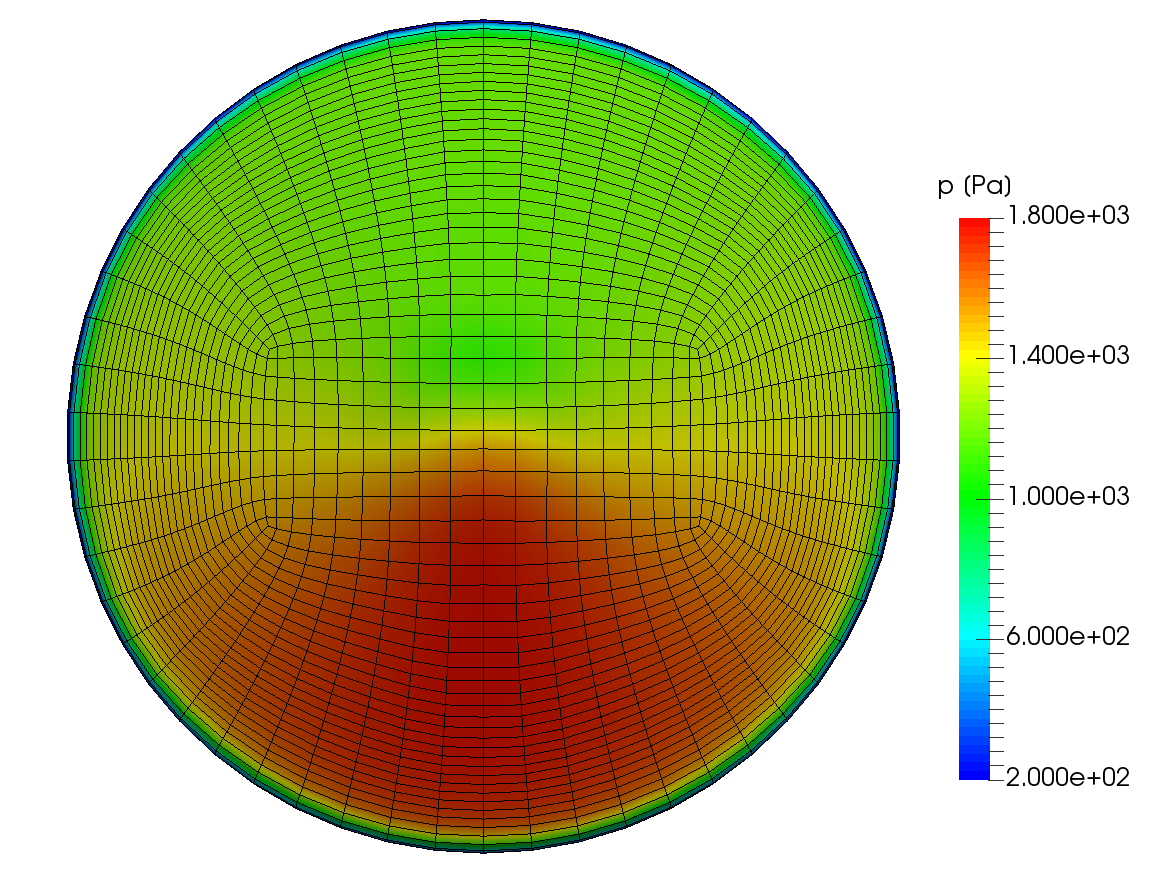
3D material response of the MSL_monolithic (100 s)
Flow_Around_Sphere
The flow_Around_Sphere tutorial computes the 3D incompressible, laminar flow around a sphere and computes drag and lift coefficients (Fig 1.48).
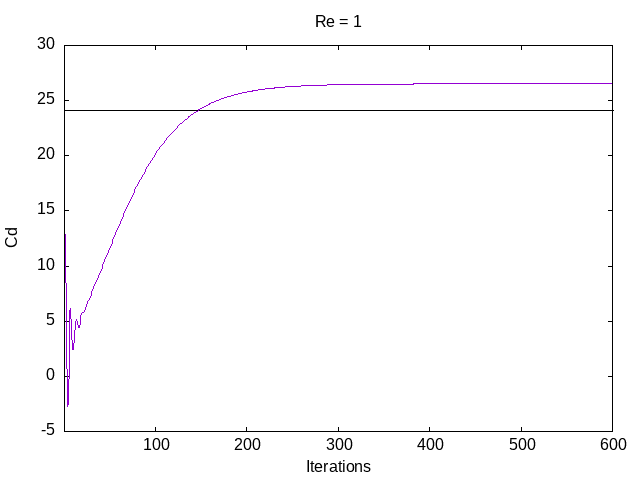
Drag coefficient of a sphere from Flow_Around_Sphere